

author image

In the world of presentation software, few names are as recognizable as Prezi. Known for its zooming user interface and non-linear storytelling, it disrupted a market dominated by slide-by-slide decks. But in 2026, with the rise of AI presentation makers, is Prezi still the king of creative presentations?

Whether you are asking “Is Prezi good to use?” or looking for presentation tools like Prezi, this guide covers everything from Prezi pricing to its latest AI features, helping you decide if it’s the right tool for you.

At its core, Prezi is a cloud-based presentation software that moved away from the traditional “slide” metaphor used by PowerPoint. Instead of flipping through pages, Prezi uses a single, massive canvas. You place your content (text, images, videos) on this canvas and create paths to zoom in and out of specific details.

This “spatial relationship” approach allows presenters to show the big picture before diving into the details, making it excellent for storytelling, educational lectures, and complex data visualization.
prezi ai interface

Is Prezi a Reliable Source?

This is a common question with two meanings.

  1. As a company: Yes, Prezi is a highly established, reliable SaaS company founded in 2009 with over 100 million users.
  2. As an information source: If you find a presentation hosted on Prezi, remember that it is user-generated content. Like a Wikipedia entry or a YouTube video, the reliability depends on the author, not the platform.

Prezi Reviews: The Good and The Bad

Based on thousands of user reviews and our own testing, here is the breakdown of the pros and cons.

Is Prezi Good to Use? (The Pros)

  • Engagement: The “Zoom Reveal” feature keeps audiences awake. It breaks the monotony of bullet points.
  • Prezi Video: A standout feature that puts you (the presenter) alongside your content on the screen, which is fantastic for Zoom or Teams meetings.
  • Non-Linear Flexibility: You can jump to different parts of your presentation based on audience questions without clicking through 20 slides.

What are the Disadvantages of Prezi? (The Cons)

  • Motion Sickness: This is the most cited complaint in Prezi reviews. If the zooming and panning are too fast or frequent, it can literally make the audience dizzy (often called “The Nausea Factor”).
  • Steep Learning Curve: Unlike the familiar interface of PowerPoint or Google Slides, Prezi requires you to think spatially.
  • Formatting Frustrations: Users often ask, “How do I add a slide in Prezi?” The answer is, you don’t add “slides”—you add “frames” or “topics.” This shift in logic can be frustrating for quick edits.
  • Paywalls: Many essential features (like offline access or PDF export) are locked behind higher-tier subscriptions.

Prezi AI Reviews: Is it Smart Enough?

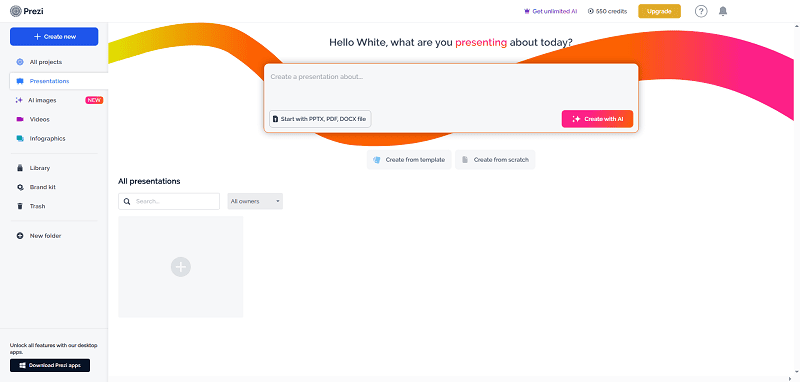
Recently, Prezi launched Prezi AI features to compete with new AI tools. Currently, Prezi AI focuses on:

  • Text-to-Presentation: You provide an outline, and it suggests a layout.
  • Text Refinement: Helping you rewrite bullet points to be more punchy.

The Verdict: While helpful, Prezi’s AI is largely integrated into its complex zooming structure. If you struggle with the canvas layout, the AI doesn’t fully solve the complexity issue. It isn’t as “one-click-done” as newer, AI-native platforms like WorkPPT AI or Gamma, which generate full slide decks with structured narratives instantly.

Prezi Pricing: Is Prezi for Free?

Yes, Prezi is for free, but with significant limitations.

Free Plan:

Free Plan: $0

  • Limit: You can create up to about 5 projects with 700 credits.
  • Catch: Your presentations are public. Anyone on the web can see them. You cannot download them for offline use.

Paid Plans: 19$/month

  • Create AI presentation: 150 credits
  • Create with content from a file: 100 credits
  • Create an image: 60 credits
  • Use premium visual: 60 credits
  • Remove image background: 25 credits
  • Transform content: 10 credits

Note: Prices are subject to change and are usually billed annually.

Prezi vs. PowerPoint: The Showdown

Feature Prezi PowerPoint
Structure Non-linear, Zooming Canvas Linear, Slide-by-Slide
Learning Curve High (Spatial thinking required) Low (Standard office tool)
Creativity High (Cinematic movement) Medium (Dependent on animation skills)
Collaboration Cloud-based, Real-time Real-time (via OneDrive/Office 365)
Best For Storytelling, Conversational Presenting Corporate Reports, Data Heavy Decks

Presentation Tools Like Prezi (Alternatives)

If the disadvantages of Prezi (like motion sickness or cost) are dealbreakers, here are the top alternatives in 2026:

1. WorkPPT

If you want the “wow” factor without the dizziness, WorkPPT focuses on leveraging AI to handle the design heavy lifting.

  • Why it wins: It generates structured, professional decks from simple text prompts. It bridges the gap between the ease of PowerPoint and the modern design of Prezi.
  • Best for: Professionals who need high-quality presentations fast without learning a new design language.

⭐⭐⭐⭐⭐ Rated 4.8 by 1.3M Users

2. Canva

  • Why it wins: Incredible library of graphics and ease of use.
  • Best for: visually heavy, design-centric slides.

3. SlidesGo

  • Why it wins: It comes with numerous PowerPoint templates.
  • Best for: Simple, image-led talks (like TED talks).

FAQs about Prezi Presentation Maker

How do I add a slide in Prezi?

In Prezi Present, you do not add “slides.” You add Topics.

  1. Go to the left sidebar.
  2. Click the green + Topic button.
  3. Choose a “Planet” (sub-topic circles) or “Stack” (linear pages) structure.

Can I convert PowerPoint to Prezi?

Yes, Prezi has a “PowerPoint Converter” feature. It imports your slides and places them on the canvas. However, you will usually need to spend time adding zoom paths to make it look like a native Prezi.

💬 Conclusion:

Prezi remains a powerful tool for presenters who want to break the mold of linear storytelling. Its zooming capabilities are unmatched for visualizing relationships between ideas. However, the steep learning curve and potential for audience motion sickness mean it isn’t the perfect tool for every meeting.

If you are looking for a tool that offers modern design, AI efficiency, and professional structure without the complexity of a zooming canvas, exploring WorkPPT AI Presentation Maker might be your next best move.

Save time on formatting with WorkPPT

Upload your Excel file and let WorkPPT automatically create clean tables, charts, and data-ready slides.