
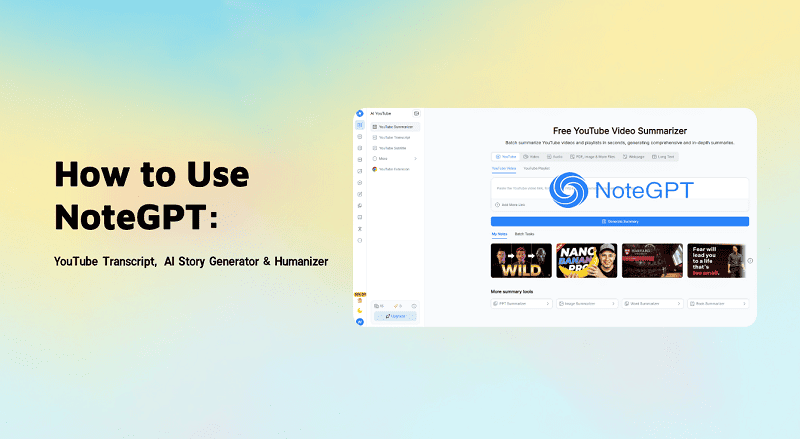

Let’s be honest: we are all drowning in information. Whether you are a student trying to finish an essay or a professional trying to keep up with industry news, watching hours of YouTube videos just to find one specific fact is exhausting.
This is where NoteGPT AI comes in.
You might have heard of it as a tool to summarize videos, but it has evolved into something much bigger. In this guide, we are going to explore what this tool actually does—from generating stories to checking for AI content—and answer the big questions: is NoteGPT free, and is it safe?
- Summarize presentations, videos, audio files, PDFs, and articles
- Turn dense materials into mind maps, flashcards, and structured notes
- Ask questions about your content via an integrated AI chat
- Translate and read content in multiple languages as you browse
Key Fearures of NoteGPT AI
| Feature Category | Key Capabilities | Best For |
|---|---|---|
| 📝 Summary & Compression | • Universal Summaries: YouTube, PDF, Articles, Podcasts, PPTs & Images. • ChatPDF: Interactive Q&A with documents. • Extraction: Pulls timestamps and key takeaways automatically. | Quickly digesting long content, exam prep, and research scanning. |
| 🎨 AI Content Generators | • Creation Tools: AI PPT Maker, Script & Paragraph writers. • Study Aids: AI Flashcards & Mind Map generators. • Creative: AI Music & Visual generation. | Turning raw notes into drafts, presentations, or study materials. |
| 👁️ Visual & Document Tools | • Visualizers: Diagrams, Flowcharts & Knowledge Graphs. • Assistants: AI PDF Reader & Homework Helper step-by-step guides. | Visual learners and students needing to structure complex logic. |
| 🌐 Browser & YouTube Helpers | • Auto-Snap: Live summaries pop up as you browse blogs or watch videos. • Transcripts: Real-time text generation alongside videos. | High-speed research without leaving the source webpage. |
| 🌍 Multilingual Support | • Translation: Supports 50+ languages. • Cross-Lingual: Summarize foreign content directly into your native language. | International research and breaking down language barriers. |
How Does NoteGPT Work?
At a high level, NoteGPT follows a three‑step pipeline: input → AI processing → outputs and tools.
1. Adding Your Content
You can bring content into NoteGPT in several ways:
- Paste a URL
- YouTube videos and podcasts
- Web pages and blog posts
- Online articles and documentation
- Upload files
- PDFs, PowerPoints, and Word docs
- Images with text (for OCR‑style extraction)
- Audio and video files (up to certain size limits)
- Enter or paste text directly
- Lecture notes
- Drafts of essays or reports
- Long email threads you want summarized
This flexibility makes NoteGPT useful whether you’re studying from lecture recordings, reading research, or reviewing client materials.
2. AI Understanding and Analysis
Once your content is loaded, NoteGPT runs it through its language models to:
- Detect key topics and subtopics
- Extract main arguments and supporting details
- Identify names, dates, and concepts that matter
- Compress long content into understandable chunks
Behind the scenes, it uses natural language processing (NLP) to map the structure of your material so it can generate summaries, visual diagrams, and Q&A responses.
3. Choose How You Want to Learn
After processing, you can decide how to interact with the content:
- Read a summary or bullet‑point outline
- Explore a mind map of the key ideas
- Generate flashcards to help you memorize
- Use AI Chat to ask follow‑up questions
- Translate snippets while you browse the web
This “multi‑view” approach makes NoteGPT more than just a one‑click summarizer. It’s designed to support active learning, not just passive reading.
NoteGPT Pricing and Plans
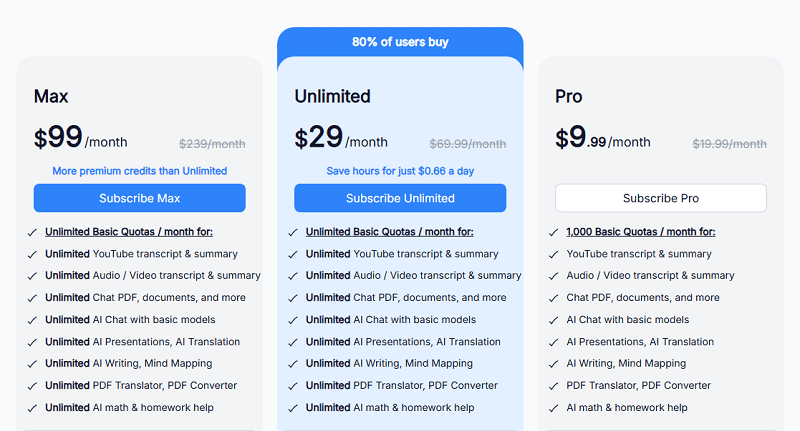
| Plan Features | Pro | Unlimited (Popular) | Max |
|---|---|---|---|
| Monthly Price | $9.99 | $29.00 | $99.00 |
| Basic Quotas (YouTube, PDF, Chat, PPT) | 1,000 /mo | Unlimited | Unlimited |
| Premium Credits (GPT-4, Images, TTS) | 100 /mo | 2,800 /mo | 10,000 /mo |
| Parallel Tasks | 5 videos | 10 videos | 20 videos |
| File Limit | 100MB | 300MB | 1GB |
| Voice Cloning | Save 2 voices | Unlimited (Save 5) | Unlimited (Save 8) |
NoteGPT Pros and Cons
Pros of NoteGPT
- Great for Learning & Studying: Tailored for students, self‑learners, and researchers who need to shorten reading/watching time and retain key ideas.
- Rich Visual Tools: Mind maps, diagrams, and flowcharts make complex topics easier to visualize and review.
- Supports Many Content Types: Handles videos, audio, PDFs, Word, PowerPoint, images, and plain text.
- Multilingual Support: Works in 50+ languages, including some less commonly supported ones.
- Affordable Entry Pricing: Low-cost basic plan makes it easy to try without committing to a big subscription.
Cons of NoteGPT
- Not a Meeting Assistant: No live meeting transcription, action items, or speaker identification.
- Requires Internet Access: Heavily dependent on a stable connection; no robust offline workflows.
- No Bot‑Free System‑Audio Recording: Unlike tools like Jamie, it doesn’t record system audio natively for any meeting platform.
- Weaker on Privacy & Compliance: Lacks the strong GDPR‑first posture and security focus that some businesses require for sensitive discussions.
- Limited Web‑Wide Research: The AI chat is mainly centered around the content you give it; it isn’t a full web search + fact‑checking engine.
✍ [Related AI Topics]:
Best 5 NoteGPT Alternatives
When looking for a NoteGPT alternative, the choice depends on whether you prioritize visual mapping, academic rigor, or long-term memory.
Here are the top 5 original NoteGPT alternatives for 2026, each optimized for a specific productivity workflow.
Quick Selection Guide:
| If you need to… | Choose This Tool | Why? |
|---|---|---|
| See the logic visually | Mapify | Best-in-class mind mapping |
| Remember it forever | Recall | Spaced repetition + Linking |
| Read a research paper | SciSpace | Academic accuracy & Citations |
| Record a live meeting | Otter.ai | Real-time transcription & Action items |
| Save time on YouTube | Eightify | 8 key takeaways in 10 seconds |
1. Mapify — The "Visual First" Knowledge Architect
While NoteGPT gives you a wall of text, Mapify reworks your content into a high-fidelity interactive mind map. It moves away from linear reading and focuses on helping you see the “big picture” of any PDF, YouTube video, or document.
- Core Strength: Converting complex hierarchies into visual structures. It’s perfect for those who find standard summaries hard to navigate.
- Best For: Brainstorming, exam revision, and breaking down multi-chapter ebooks.
- The Edge: It features a unique “PPT-to-MindMap” engine that extracts logic flows from slide decks, which is a massive time-saver for corporate strategy sessions.
2. Recall — The "Second Brain" with Spaced Repetition
NoteGPT is great for instant reading, but Recall is built for long-term retention. It doesn’t just summarize; it uses a “Knowledge Graph” to link new information to notes you’ve saved months ago.
- Core Strength: Knowledge connectivity. Every summary you save is automatically linked to related concepts already in your library.
- Best For: Deep research, personal knowledge management, and lifelong learners.
- The Edge: It integrates Spaced Repetition (like Anki). It will resurface key insights at the perfect time so you actually remember what you summarized.
3. SciSpace — The Gold Standard for Academic Research
For users dealing with heavy technical papers or journals, NoteGPT can be too general. SciSpace is an AI co-pilot specifically trained on millions of research papers, making it far more accurate for STEM and academic work.
- Core Strength: Deep technical decoding. You can highlight a complex math formula or a dense table, and SciSpace will explain it in plain English.
- Best For: Ph.D. students, researchers, and anyone conducting literature reviews.
- The Edge: The “Citation Trace” feature. Every claim the AI makes is backed by a real, clickable citation from the source paper, virtually eliminating AI hallucinations.
4. Otter.ai — The "Real-World" Meeting Secretary
NoteGPT handles static links well, but Otter.ai dominates live spoken content. Whether it’s a lecture hall or a Zoom boardroom, it provides millisecond-accurate live transcription and speaker identification.
- Core Strength: Multi-speaker recognition. It precisely attributes quotes to specific people and generates “Action Items” based on the conversation flow.
- Best For: Corporate meetings, journalism interviews, and live classroom settings.
- The Edge: The OtterPilot feature can join meetings on your behalf, recording and summarizing the call even if you can’t attend in person.
5. Eightify — The Minimalist YouTube Filter
If your main goal is to decide if a 2-hour podcast is worth your time in under 10 seconds, Eightify is the leanest solution. It skips the “note-taking” fluff and delivers exactly 8 core takeaways.
- Core Strength: Extreme speed. It’s a dedicated YouTube extension that lives directly under the video player for zero-friction summaries.
- Best For: Tech enthusiasts, self-learners, and news junkies who consume massive amounts of video.
- The Edge: It aggregates user insights. It doesn’t just summarize the video script; it looks at high-value comments to ensure the summary captures what the community found most useful.
Is NoteGPT Worth It? Our Verdict
When NoteGPT Makes Sense
- Spend a lot of time learning from content (courses, lectures, books, papers, long videos).
- Want tools like mind maps, flashcards, and summaries to support exams or self‑study.
- Need quick multi‑format summarization (video, PDF, articles) without heavy meeting features.
- Are on a tight budget and prefer lower monthly costs.
When NoteGPT Isn’t Enough
You’ll likely outgrow NoteGPT if you:
- Regularly run or attend business meetings and need reliable, structured notes.
- Require live or near‑real‑time transcription with speaker identification.
- Work with sensitive information that must comply with strict privacy standards (e.g., GDPR).
- Need a single workspace to manage meeting outcomes, tasks, and follow‑ups.
In those cases, NoteGPT alternatives are much better fit. It’s designed from the ground up to be a meeting co‑pilot, not a general study helper.
FAQs About NoteGPT AI
What are NoteGPT’s most useful features?
Most users rely on:
- Video and PDF summaries
- Mind maps and diagrams
- Flashcard generation
- AI chat with uploaded content
- Browser‑based Auto‑Snap summaries for articles and videos
These features make it a powerful study and research companion.
What types of content can I summarize with NoteGPT?
NoteGPT supports:
- YouTube videos and podcasts
- Web pages and online articles
- PDFs, Word documents, and PowerPoint decks
- Audio and video uploads
- Images containing text
- Plain text pasted in directly
Can NoteGPT transcribe audio and video?
Yes, it can transcribe pre‑recorded audio and video files, as well as many YouTube videos. However, it’s not optimized for live meeting transcription the way a dedicated meeting tool like Turnitin.

📄 Text & documents to slides quickly
🧠 Powerful AI toolkits to save time
🎨 5,000+ education-ready templates
📤 Export to PPTX, PDF, or Google Slides

