
author image

Can Canva create a presentation from text? And more importantly, how good is Canva AI Presentation Maker compared to other AI deck tools? In this in-depth guide, we will cover:

  • How Canva AI presentation works
  • Key features, pricing, pros and cons of Canva Magic Design for presentations
  • How to use Canva AI to make a presentation
  • The top alternatives to Canva AI presentation maker

This article is written for users who want a clear, practical, and honest evaluation.

Yes, Canva can create a presentation from text. Using Canva AI Presentation Maker, also known as Magic Design for presentations, users can input a text prompt or upload a document, and Canva will automatically generate a complete slide deck.

Features of Canva AI Presentation

When using Canva AI to create decks, you can expect the following features:

  • Text-to-presentation generation from prompts or uploaded documents
  • Automatic slide structure and layout
  • AI-generated images matched to your content
  • Style-based templates optimized for presentations
  • Built-in editing using the Canva editor

This makes Canva especially appealing to beginners and non-designers who want quick results.

Canva AI Presentation Pricing

Canva AI presentation features are available across Canva plans, but with important limitations.

  • Free plan:
    • Free AI presentation generation
    • File export is restricted
    • Presentations include prominent Canva branding
    • PPT download is not available without upgrading
  • Canva pricing plan:
Premium BenefitsCanva ProCanva Business
Pricing$15/month; or $120/year$20/month; or $200/year
Designer-made templates
Background remover
Resize designs instantly
Brand Kits5100
AI usage limitsHighHigher
Cloud storage100GB500GB
Canva Grow insights
Print discount10% off
Included subscriptions (Beta)Leonardo.ai, Flourish

Pros and Cons of Canva AI Presentation Maker

We entered the text prompt “The Impact of AI in Daily Life” into Canva AI Presentation and evaluated the entire workflow and the final output. Based on this hands-on experience, we summarized Canva’s pros and cons.

Advantages of Canva AI Presentation Maker

1. Flexible Control Over Audience, Tone, and Style: Canva allows users to define target audience, writing tone and visual style. This level of control helps tailor presentations to different scenarios.

2. Multiple Presentation Versions Generated at Once: Canva AI creates four presentations simultaneously, saving time and providing creative options.

3. AI Automatically Matches Images With Text: Slides are generated with relevant visuals, reducing the need for manual image searches.
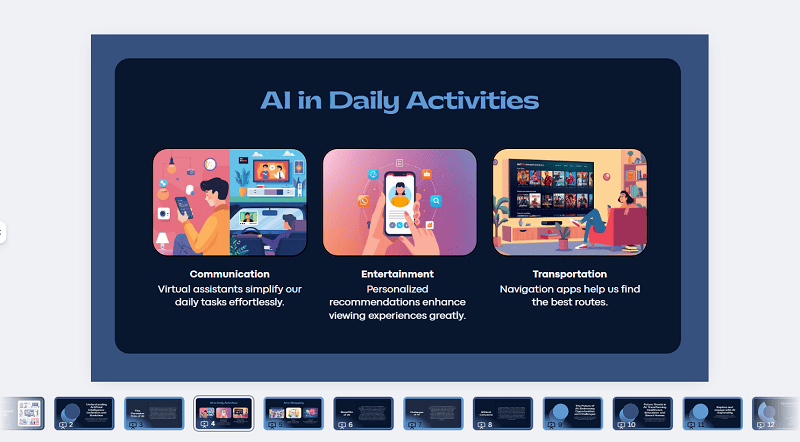
canva slide image quality

4. Free AI PPT Generation and Public View Links

Disadvantages of Canva AI Magic Design

1. Text-Heavy Slides: Canva often produces slides with large blocks of text. For example, a 12-slide presentation may include 7 slides dominated by long paragraphs, which is not ideal for live presentations.
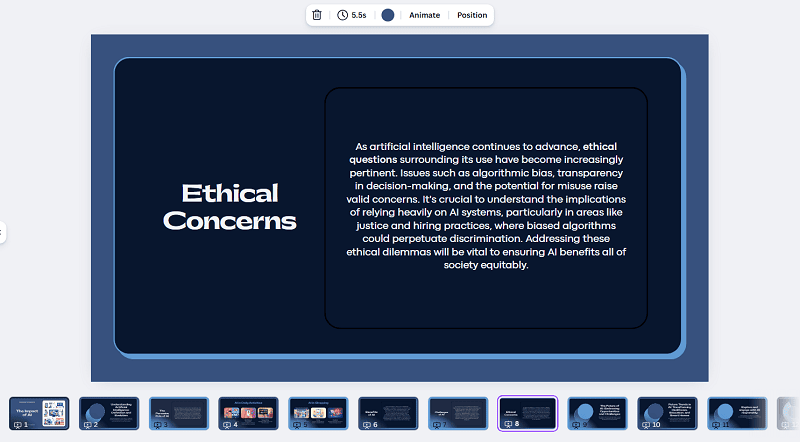
canva long content

2. PPT Export Formatting Issues: When exporting to PPT format, layouts may break, causing misaligned text, font inconsistencies, design elements shifting positions.
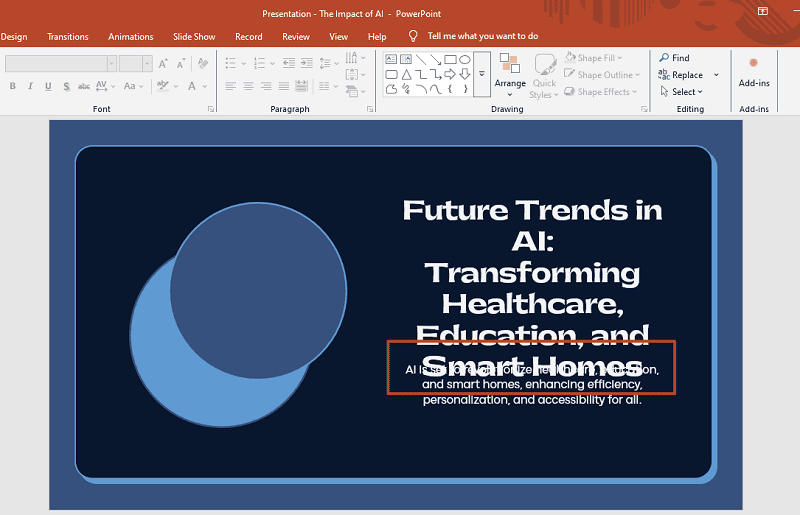
canva export formatting issues

3. Shallow, Generic Content: The generated content often lacks depth and uses: broad statements, buzzwords, high-level, vague language. This makes Canva AI less suitable for data-driven or persuasive decks.

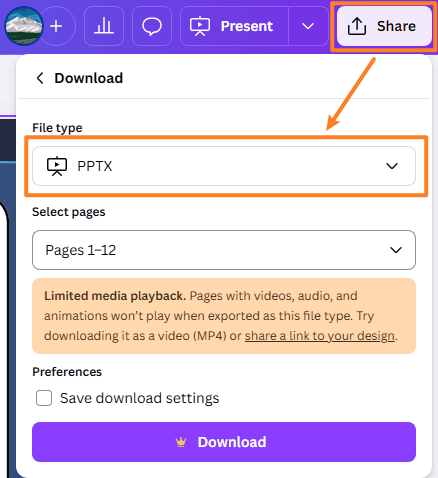
4. PPT Export Requires a Paid Plan: Only paid users can export presentations as PPT files. Free users are limited to public view links with visible Canva logos.

How to Use Canva AI to Make a Presentation (Step-by-Step)

  • Visit the Canva website and go to the Home page
  • Select Canva AI → Design → Presentation
  • Choose audience, style, and length, then enter your text prompt
    • If you already have a document, click the “+” icon to upload your file

    type text prompt in-canva

  • Select a template style and click Submit
  • Review and edit the AI-generated outline (add, remove, or modify slides)
  • Click Generate PPT
  • After generation, you can:
    • Use the AI chat bar to refine slides
    • Edit text manually
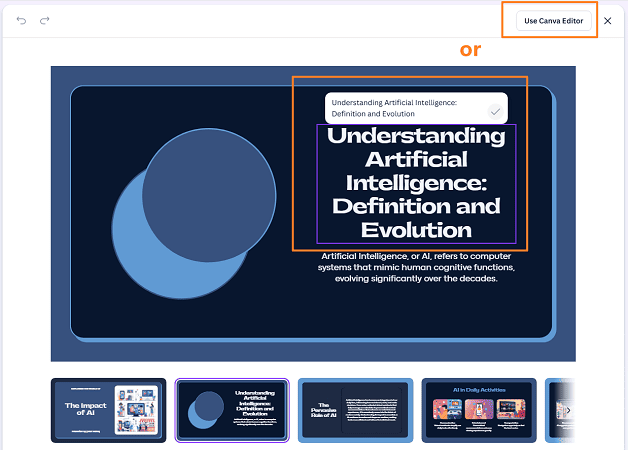
    • Click “Use Canva Editor” for advanced design editing

      edit canva slides

    • Click Share to export as images, PDF, PPT, or a link

      download canva ppt

Top 3 Alternatives to Canva AI Presentation Maker

Canva AI vs Alternatives Comparison Table

While Canva is popular, it is not always the best choice for professional presentations. Here are three strong alternatives.

Tool Input Types Content Depth Design Quality Free Export Best For
Canva AI Text, files Low–Medium High (web) Quick visual decks
Gamma Text Medium High Storytelling presentations
Beautiful.ai Text Medium High Limited Business & pitch decks
WorkPPT Text, files, data High High Professional productivity

1. Gamma

Gamma focuses on storytelling and visual flow. It produces clean, modern slides that work well for:
  • Narrative presentations
  • Product storytelling
  • Internal communication
Gamma offers better visual consistency than Canva AI.

2. WorkPPT

WorkPPT AI presentation is designed for productivity and professional output. It supports:

  • Topic-to-PPT generation
  • File and data-based slide creation
  • Structured, business-ready content

WorkPPT is a strong alternative for users who need depth, logic, and export-ready PPT files.

⭐728323 presentations made

Watch video about WorkPPT:

3. Beautiful.ai

Beautiful.ai emphasizes design automation and layout rules. It is ideal for:
  • Business presentations
  • Pitch decks
  • Professional reports
Compared to Canva, Beautiful.ai enforces stronger visual structure.

FAQs About Canva AI Presentation

Can Canva create a presentation from text?

Yes. Canva Magic Design allows users to generate presentations directly from text prompts or uploaded documents.

Is Canva Magic Design free?

Partially. Free users can generate presentations but cannot export PPT files.

Is Canva good for pitch decks?

Canva offers many pitch deck templates, but AI-generated content may lack depth. For investor-ready decks, alternatives may perform better.

What is the best Canva pitch deck template?

The best template depends on your industry, but minimalist business templates tend to perform best for professional use.

💬 Conclusion

Canva AI Presentation Maker is a powerful and accessible tool for quickly creating visually appealing slide decks from text. However, its limitations—such as text-heavy slides, shallow content, and restricted PPT exports.

If you need quick visuals, Canva AI is a solid choice. If you need structured content, reliable PPT exports, and business-ready decks, tools like WorkPPT, Gamma, or Beautiful.ai may be better options.

Choosing the right tool ultimately depends on whether you prioritize design speed or presentation quality.

WorkPPT AI Presentation- Editor’s Choice

📄 Text & documents to slides quickly
🧠 Powerful AI toolkits to save time
🎨 5,000+ education-ready templates
📤 Export to PPTX, PDF, or Google Slides