


Are you still relying on ChatGPT as your primary AI tool? ChatGPT is undoubtedly powerful, but in 2026, it represents only a small part of the AI productivity tools landscape. Beyond chatbots, there are specialized AI tools. This guide brings together the best AI productivity tools of 2026.
To understand which tools actually improve productivity in real-world scenarios, our team tested and reviewed 50+ AI productivity tools, covering AI in education, content creation, project management, and so on. Our evaluation focused on practical use cases like speed, output quality, ease of use, and real efficiency gains in daily work.
Below, you’ll find the AI productivity tools that delivered the most practical value in our tests, categorized to help you quickly find the tools you need.
1. AI Productivity Tools for Research and Brainstorming – Gemini, ChatGPT
2. Top AI productivity Tools for Presentation Design – Gamma, WorkPPT
3. Best AI Tools for Productivity in Content Creation – Jasper, Jenni, Copy.ai
4. AI Assistant for Improving Grammar and Writing – Grammarly, LanguageTool
5. AI Tools for Work Email Management/Improvement – SaneBox, Mailmeteor
6. AI – Powered Productivity Tools for Notes Taking – Otter.ai, Alice
7. AI-Poweredvity Tools for Image Creation – Perchance, Nano Banana
8. Best AI Tools for Productivity in Video and Editing – Invideo, Synthesia
9. AI-Poweredvity Tools for Social Media Management – Hootsuite, Metricool
1. AI Productivity Tools for Research and Brainstorming
Gemini is Google’s AI model and productivity assistant, designed to help users with research, idea generation, writing, analysis, and problem-solving. You can think of Gemini as Google’s answer to ChatGPT. But with a stronger emphasis on search, information synthesis, and integration with Google’s ecosystem.
One major feature of Gemini is that its answers usually include reference links. This means the responses are not made up without sources. You can verify the source of the information, which makes the results more reliable for learning and research.
Gemini offers three different modes:
- Faster: Answers quickly
- Thinking: Solves complex problems
- Pro: Thinks longer for advanced maths and codes
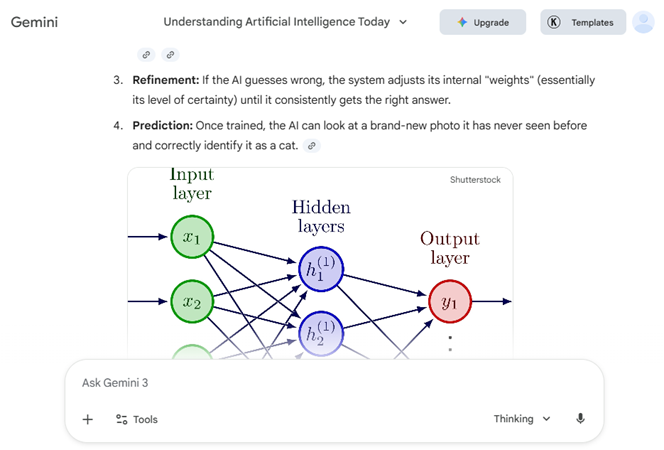
I asked the same question, “What is AI?” in both Faster and Thinking modes. Fast mode responded more quickly. The answer was clear and mostly complete. While in thinking mode, the response was more detailed. It explained the topic step by step and included visual images, such as diagrams that showed the “Layers of AI.”
Beyond common AI tasks like deep research, reading, and understanding documents, Gemini also supports video analysis and music recognition. You can upload a video file and ask questions about its content, or send an audio clip and ask Gemini to identify the song.
💡 Key Features:
- 1. Ask questions on almost any topic and explore answers grounded in Google Search.
- 2. Talk with Gemini in real time to brainstorm ideas, practice interviews, or discuss.
- 3. Generate drafts, summarize text, and get feedback on uploaded documents.
- 4. Work across Gmail, Calendar, Maps, YouTube, and Photos without switching apps.
- 5. Analyze hundreds of sources and turn them into clear research reports in minutes.
😊Pros
- Up-to-date responses reflecting recent trends and research.
- Extended context for long documents and conversations.
- Strong multimodal support with text, images, audio, and video.
😑Cons
- Voice mode is unstable.
- Limited to 10 file uploads.
- Sometimes loses context in multi-step conversations.
- Free: Limited features
- Google AI Pro¹: $19.99/month(University students get free for one year)
- Google AI Ultra²: $124.99/momth
ChatGPT is an AI chatbot developed by a company called OpenAI. Think of it as a computer program that has “read” almost everything on the public internet. Because it has processed all that information, it can have conversations with you that feel remarkably human.
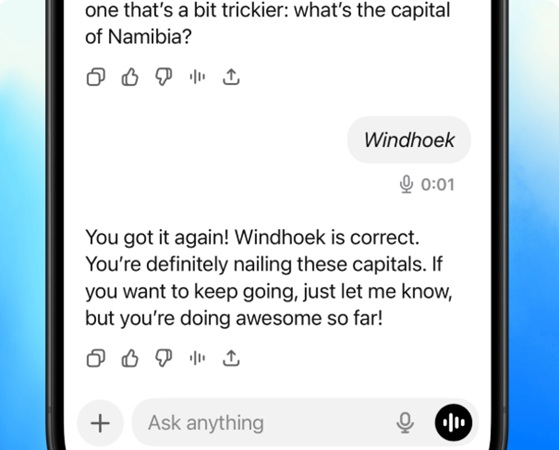
The microphone function of ChatGPT is extremely excellent. It enables you to see the text after you finish speaking, and even allows you to switch to text prompts. You can use this function to practice your spoken language:
“Help me practice ordering an iced latte in Japanese.”
💡 Key Features:
- 1. From professional business emails to emotional poetry, it offers strong and versatile writing capabilities.
- 2. It supports real-time voice conversations with very low latency and can speak in different tones, emotions, or accents.
- 3. With web-connected search, it can provide up-to-date news, stock market information, and weather updates.
- 4. It works seamlessly across the web, iOS, Android, and Mac desktop platforms.itching apps.
- 5. It can write, debug, and explain code in most major programming languages.
😊Pros
- It remembers your conversation better than many other AIs.
- The voice mode feels like talking to a human and rarely has errors.
- It performs exceptionally well in logical and mathematical problems.
😑Cons
- It may fabricate content that seems reasonable but is actually incorrect.
- It can sometimes reflect the biases or prejudices found in human writing.
ChatGPT Pricing
Free: Limited features
Plus: $20/month
Pro: $200/momth
✍ [Similar AI Chatbot Review]: NoteGPT: Review, Alternatives and Use Tutorial
2. Top AI productivity Tools for Presentation Design
Gamma is an AI-powered content creation platform that helps you generate presentations, documents, and simple websites from a short prompt, existing text, or files. It positions itself as a more flexible alternative to traditional slide tools by using a card-based layout instead of rigid slides.
This is a slide presentation generated by Gamma, with the theme of “How to Write a Good Prompt for AI Presentation Generation”. The slide design looks modern and visually appealing, with a clear color scheme and consistent typography that makes the content easy to read.

💡 Key Features:
- 1. AI generation of full presentations or pages from prompts, uploaded documents, or URLs, with automatic structure and design.
- 2. Built-in AI for rewriting, summarizing, changing tone, and restyling layouts in one click.
- 3. Support for text, images, video embeds, charts, and interactive elements, plus one-click theme changes.
- 4. Real-time collaboration with comments, notifications, and sharing via link or export to PDF/PPT/Google Slides.
😊Pros
- Generates full presentations, documents, or webpages rapidly
- Offers clean, interactive, scrollable formats with media embeds, polls, charts.
- Responsive design across devices, and easy sharing/export options.
😑Cons
- Limited customization, such as basic themes, fixed fonts/sizes, no animations.
- Sometimes weak for PowerPoint/Google Slides compatibility.
- The sizes of the slides are not uniform.
💰Gamma Plans
- Free: Limited AI credits
- Plus: $10/seat/month
- Pro: $25/seat/momth
- Ultra $100/seat/momth
Tip: To subscribe, use the coupon code to receive a discount.
WorkPPT is one of the best AI presentation makers that generates slide decks from prompts or uploaded files. In testing, it delivers a genuinely faster workflow while still leaving room for human control over structure and design.
The core value is speed: going from a one‑line idea or dense PDF to a multi‑slide presentation typically takes under a minute.
Content quality is generally solid at the outline and first‑draft level, with logical sectioning and reasonably clear bullet points, although complex or niche topics still benefit from user editing to ensure accuracy and nuance.
Here is an output on WorkPPT:

💡 Core Features of WorkPPT AI Presentation:
- 1. Turns text, file or images into full presentations in one click.
- 2. It offers 5000+ professional templates spanning business reports, education, marketing, pitch decks, and more.
- 3. AI designs how many points belong on a slide, how to arrange text and visuals.
- 4. Every element remains editable after AI generated content, enabling customization and lowering the risk of AI detection.
- 5. Finished decks can be exported as PPTX, PDF, image files, or shared via online links.
⭐⭐⭐⭐ Get 4.3 Stars on Trustpilot
Beyond the AI slide function, WokrPPT also integrated additional AI Tools and Utilities
- AI Summarizer
The AI summarizer condenses long articles, reports, or PDFs into concise overviews that can serve as a ready‑made base for new slide decks or handouts. - Mind Map Generator
WorkPPT can turn a topic or block of text into a visual mind map, helping users explore and organize ideas before converting them into a linear slide narrative. - PDF & Document Toolkit
Built‑in PDF tools for merging, splitting, watermarking, and image‑to‑PDF conversion keep common file‑prep tasks in the same workspace used for presentations. - Integrated AI Chat
An integrated AI chat assistant helps refine slide copy, brainstorm additional points, and draft speaker notes directly within the presentation workflow.
- Free Plan – Try all features for free
- 1 Month Plan – $19.99 billed monthlyabout (about $0.67/day)
- Unlimited Year Plan – $99.99 billed annually(about $0.27/day)
🔔 Want to know more types of AI presentation makers?
3. Best AI Tools for Productivity in Content Creation
Jasper is an AI writing platform designed mainly for marketing, branding, and business content creation. Unlike general AI assistants such as Gemini or ChatGPT, Jasper focuses on helping teams produce on-brand written content at scale.
To test Jasper in a real work scenario, I used it to help write a section of a blog post about AI productivity tools. My task was to generate a paragraph that explains “Why AI tools help with idea generation”. I Set the brand tone to “clear and professional.” and entered a simple instruction:
“Write a blog paragraph explaining how AI tools help with idea generation for content creators.”
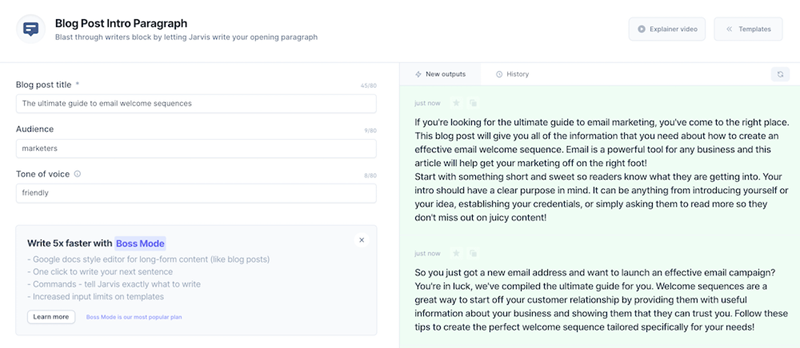
Within a few seconds, Jasper generated a clear and readable paragraph with grammatically correct sentences and a logical structure. The content stayed on topic and matched the “clear and professional” tone I had set.
💡 Key Features:
- 1. Define how your brand sounds and keep this tone across all content.
- 2. Transform project briefs into multi-channel campaigns instantly.
- 3. Automate SEO and research with specialized AI agents.
- 4. Create brand-aligned visual assets with integrated image tools.
- 5. Boost visibility across search engines and AI platforms.
😊Pros
- Fast content generation for blogs, ads, and marketing copy
- Useful templates for common business writing tasks
- Good collaboration features for teams and agencies
- Easy to use for non-technical and marketing users
😑Cons
- Output can feel generic without detailed instructions
- Text-only tool with no image or video understanding
- Paid plans may be expensive for individual users
- Monthly: $69 month/seat
- Yearly: $59 month/seat
Jenni is an AI writing assistant designed to help users create longer written content, especially essays, blog posts, and articles. Unlike tools that focus mainly on short marketing copy, Jenni is aimed at idea development, research synthesis, and drafting structured content.
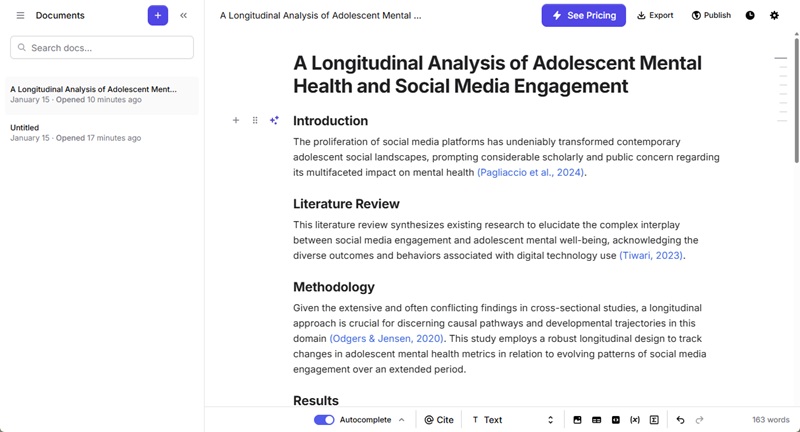
In my hands-on test with Jenni, I asked it to generate a structured outline for a research topic titled “Beyond Screen Time: A Longitudinal Analysis of Adolescent Mental Health and Social Media Engagement.”
Jenni quickly produced a logical set of standard headings and filled in content for each section. The text it generated was professional and formal, fitting the tone expected in academic writing. It also included reliable and recent reference sources, which made the draft feel well-grounded and useful for further refinement.
💡 Key Features:
- 1. Accelerate writing with context-aware AI autocomplete suggestions.
- 2. Generate citations in APA, MLA, Harvard, or Vancouver formats.
- 3. Search and cite credible sources directly from academic databases.
- 4. Scan documents for plagiarism to ensure original content production.
- 5. Paraphrase complex sentences while maintaining the original meaning.
- 6. Chat with uploaded PDFs to extract and summarize information.
😊Pros
- Simplifies the process of citing sources and managing bibliographies.
- Maintains a professional academic tone throughout the document.
- Intuitive interface that mimics a standard research document editor.
- Helps overcome writer's block with intelligent content expansion.
😑Cons
- Limited word count available on the free starter plan.
- Requires manual verification to prevent potential factual hallucinations.
- Less effective for creative marketing copy or visual generation.
- Offline access is currently not supported for the editor.
- Free: Limited features
- Unlimited: $30/month
Copy.ai is an AI-powered writing tool designed to help users create short, clear, and persuasive business content. It is mainly used for marketing, sales, and everyday business communication rather than long academic or research writing.
For short copy tasks like social media posts, Copy.ai excels at rapid generation of clear and engaging text. The results are practical and require minimal editing, though adding more product details in the prompt can improve originality and specificity.
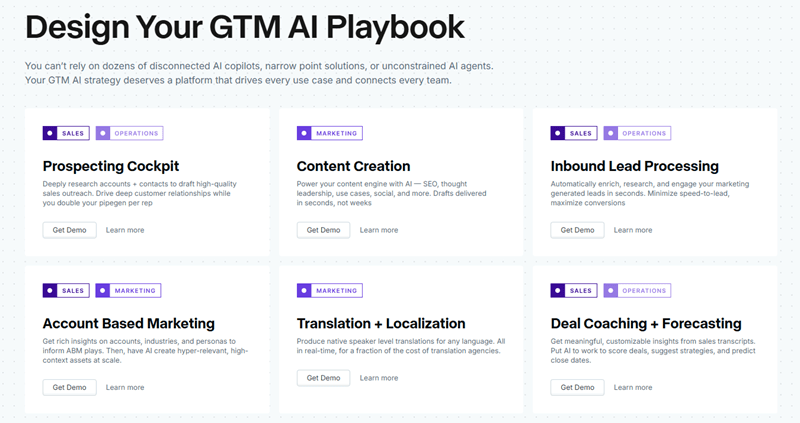
💡 Copy.ai helps you write:
- Marketing copy and product descriptions
- Social media posts and captions
- Email subject lines and short emails
- Ad copy and landing page text
- Sales and outreach messages
😊Pros
- Reduces time spent on repetitive marketing and sales tasks
- Maintains a professional academic tone throughout the document.
- Intuitive interface that mimics a standard research document editor.
- Helps overcome writer's block with intelligent content expansion.
😑Cons
- Not designed for long-form or deep content
- Limited research and fact-checking ability
- Output may need editing for originality
- Monthly: $29/month
- Yearly: $24/month
Tip: However, AI-generated text may still feel overly polished or predictable. Pairing writing tools with AI Humanizers can help adjust tone, vary sentence structure, and reduce detectable AI patterns.
4. AI Assistant for Improving Grammar and Writing
Grammarly is an AI-powered writing assistant designed to help users write more clearly and correctly. It checks grammar, spelling, and punctuation. Grammarly currently supports suggestions in 5 languages: Spanish, French, Italian, German, and Portuguese.
Beyond basic error correction, Grammarly can also suggest better word choices, adjust tone, and rewrite sentences to sound more formal, friendly, or concise. This makes it useful not only for students but also for professionals writing emails, reports, or marketing content.
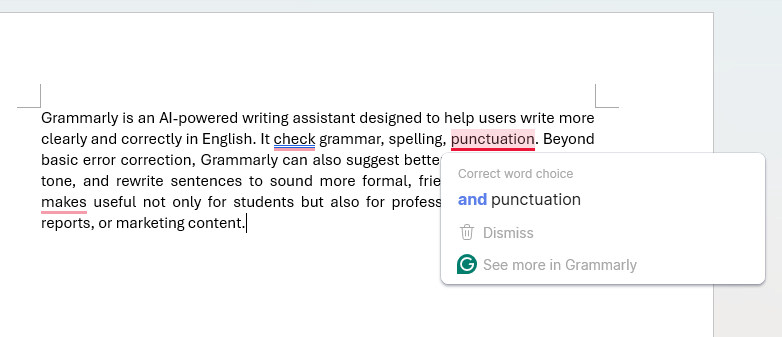
The image above shows my experience using Grammarly in Microsoft Word. It can identify grammar mistakes and suggest corrections, and I can fix them by clicking directly on the highlighted areas.
Grammarly also works across a wide range of platforms and environments:
- Microsoft Office, including Microsoft Word (desktop and web)
- Web browsers via extensions for Chrome, Edge, Firefox, and Safari
- Grammarly web editor for writing or pasting text online
- Desktop apps for Windows and macOS
- Google Docs with real-time writing suggestions
- Email platforms such as Gmail, Outlook, and Yahoo Mail
- Social media and content platforms like LinkedIn, X (Twitter), and Medium
- Mobile devices through Grammarly Keyboard on iOS and Android
💡 Key Features:
- Grammar and spelling correction
- Clarity and sentence improvement suggestions
- Tone and formality detection
- Vocabulary enhancement and word choice suggestions
- Plagiarism detection (paid plans)
- AI rewriting and text generation
- Writing goals based on audience and intent
- Real-time suggestions across platforms
😊Pros
- It provides instant feedback as you type across almost all platforms.
- Its grammar and punctuation engine is generally more precise and context-aware.
- It offers Suggested revisions with explanations.
😑Cons
- Sometimes it over-corrects.
- It has limited offline capabilities.
- It may miss deep contextual nuances or specialized technical jargon.
- Free: Only for checking grammar mistakes
- Pro: $12/month
LanguageTool is an AI-powered writing assistant that helps people write more accurately and clearly. It supports over 30 languages, including English, Spanish, French, German, and many more. The main goal of LanguageTool is to check your writing for mistakes and suggest improvements.
LanguageTool can be used in different ways. You can use it online through a website, install it as a browser extension, or integrate it into programs like Microsoft Word, Google Docs, and LibreOffice. There is also a desktop app and a mobile version for checking writing on the go.
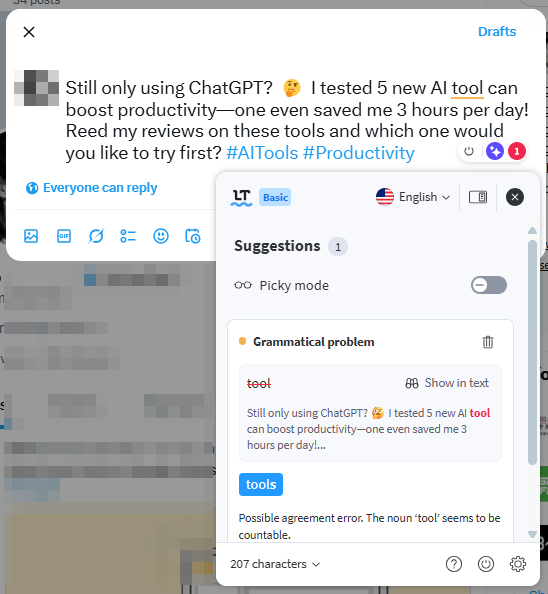
My real use case: While editing a post on X, I deliberately misused a singular form and made a spelling mistake. LanguageTool detected the singular/plural error almost instantly, but it failed to catch the misspelling of “read,” showing that it sometimes struggles to identify errors that require understanding the context.
💡 Core Features:
- Supports grammar and spelling checks in 30+ languages and variants.
- Identifies overly complex phrasing, repetition, and clarity issues.
- Works in browsers, desktop apps, and office suites (e.g., Word/Google Docs).
- Allows embedding grammar checks in other applications.
😊Pros
- More languages(30+) than most competitors.
- Browser extensions and desktop apps are faster and less "bloated".
- Unique semantic checks like mismatched dates.
😑Cons
- The free version has character limits
- Less advanced generative AI
- Cannot be used in Google Sheets
- Free: Basic feature
- Monthly: $24/month
- Quarterly:$49
- Annual: $69.9
- 2 Year Plan: $119.8
5. AI Tools for Work Email Management/Writing

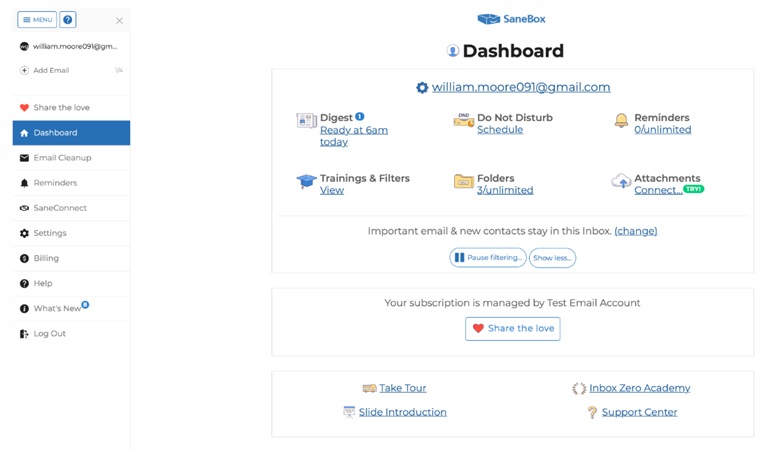
- SaneBox connects to your email server and analyzes email headers (sender, subject, timing) without reading the content of your messages.
- Based on your past behavior, it learns what kinds of messages you consider important and what you usually ignore.
- It creates additional folders, such as SaneLater, SaneNews, or other smart folders, to sort unimportant emails automatically.
💡 Powerful Features:
- Email Deep Clean: Purge thousands of unneeded old emails in minutes.
- SaneLater: Automatically moves unimportant messages to a separate folder.
- SaneBlackHole: Banishes annoying senders forever by ensuring you never see another email.
- Reminders: Provides follow-up alerts for urgent emails.
- Digest: Offers an executive summary of unopened emails with bulk actions to organize your messages.
😊Pros
- Works with existing email accounts
- You can train the system by moving emails between folders
😑Cons
- No permanent free version available.
- Takes about two weeks to calibrate perfectly.
- Important emails can occasionally be misfiled.
- Less convenient for mobile management on Android.
| Billing Cycle | Snack Plan | Lunch Plan | Dinner Plan |
|---|---|---|---|
| Monthly | $7.00 / mo | $12.00 / mo | $36.00 / mo |
| Annually | $4.92 / mo | $8.25 / mo | $24.92 / mo |
| Biyearly | $4.13 / mo | $7.04 / mo | $20.79 / mo |
Mailmeteor is a mail merge and email outreach tool that helps you send personalized bulk emails quickly and easily. Rather than sending the same generic message to everyone, Mailmeteor allows you to automatically customize each message.
At its core, Mailmeteor plugs into your existing email platforms and lets you combine a contact list with an email template. It dynamically inserts personalized information into each email while sending them in bulk.
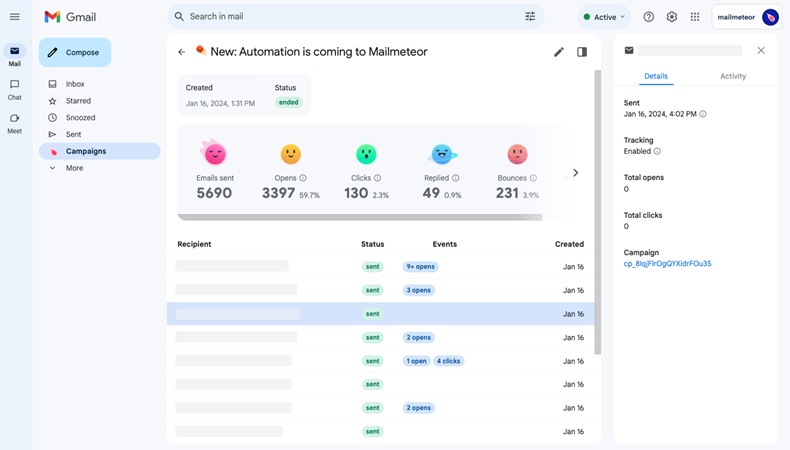
❓How Does It Works:
The process is designed to be incredibly simple. It generally follows these three steps:
1. Prepare your list: You list your contacts in a Google Sheet (Email, First Name, Company, etc.).
2. Create a template: You write your email in Mailmeteor and use “variables” (like {{Firstname}}) to tell the system where to insert the data from your sheet.
3. Preview and Send: You can see exactly what each person will receive before hitting send.
💡 Other Functions of Mailmeteor:
- It monitors your sent emails in real-time, providing instant notifications on when recipients open it.
- AI eamil writer helps you to rewrite, improve, or shorten your email content.
- Email Finder can discover the email addresses of anyone through a name and company.
- Email Checker verifies email addresses in your list to ensure they are active and correct.
😊Pros
- Offers a free plan with basic functions like mail merge and AI writer.
- Seamless integration with Gmail and Google Sheets.
- Sent directly through your Gmail account (not a third-party server).
😑Cons
- Mail sending is constrained by Gmail’s daily quotas
- Reporting and campaign insights are simple
- Basic email templates and limited customization options
- Free: Limited feature
- Starter: $4.99/month
- Premium:$12.99
- Pro: $24.99
6. AI - Powered Productivity Tools for Notes Taking
Otter.ai is an AI-powered transcription and meeting notes tool that converts spoken language into written text automatically. Real-time conversations, meetings or uploading audio are all acceptable. Otter will create a transcript you can edit, search, and share.
In our experience with Otter.ai, it effectively captured most of the spoken content in real-time and made reviewing discussions significantly faster than manual note-taking. However, we also noticed that accuracy dropped noticeably in the presence of background noise, overlapping speakers, or strong accents. It means you need to check and edit the transcript afterward.
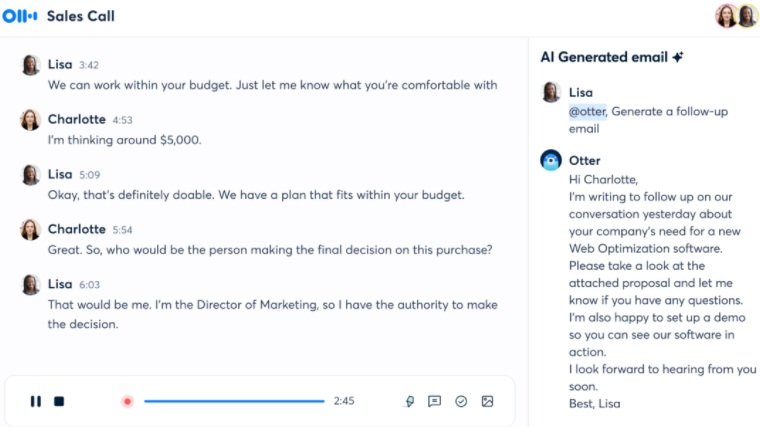
Beyond business meetings and media interviews, Otter.ai is also one of the best AI productivity tools for students. It can record and transcribe lectures, classes, and academic talks, helping students capture detailed notes without worrying about missing important points.
💡 Key Features:
- AI Chat for asking questions, extracting info, and generating plans or emails.
- Automatically captures and assigns tasks from your meetings.
- Condenses any meeting into a short, easy-to-read overview.
- Connect to your Google or Microsoft calendar and automatically join the meeting and take notes.
😊Pros
- Transcripts can show who spoke and let you easily find specific parts later.
- Works well with Zoom, Google Meet, Microsoft Teams
- Allows adding specific vocabularyto the dictionary to improve transcription precision.
😑Cons
- It primarily excels in English, with limited support for other languages.
- Transcription quality drops with strong accents or background noise,
- Basic: Free
- Pro: $16.99/user/month
- Business: $30/user/month
Alice is an AI-powered voice recording and transcription platform focused on privacy, speed, and accuracy. It lets you record conversations, meetings, interviews, or lectures and instantly convert the spoken audio into written text.
In our test, we used Alice’s web version to transcribe a 10-minute presentation recording. The transcription was generated quickly, and the overall meaning of the content was accurately conveyed. However, some words were misrecognized, and a few sentences sounded unclear. It also needs manual review and editing to achieve a polished result.
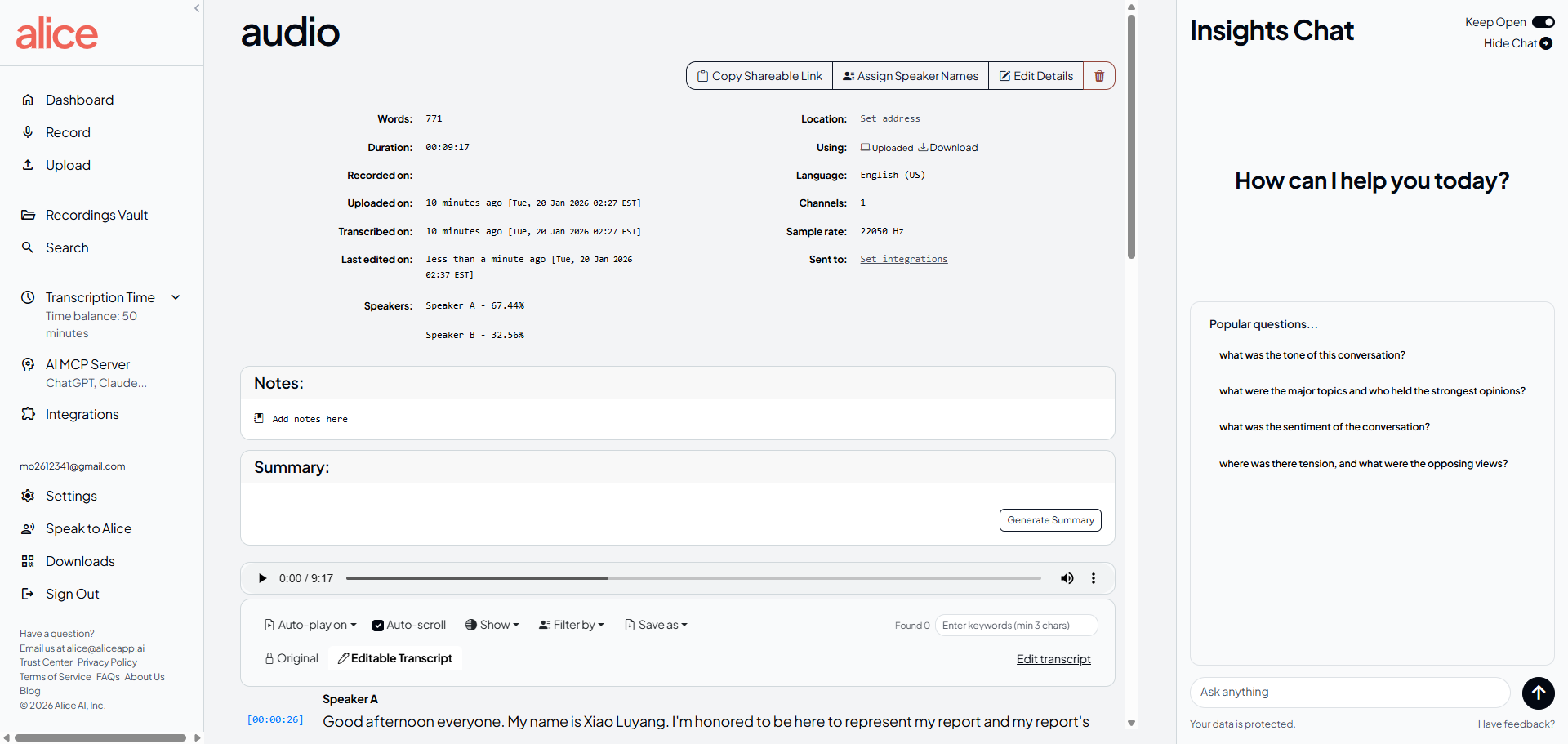
💡 Key Features:
- Record audio directly from your device or upload existing audio/video files for transcription.
- Get fast, AI-powered transcripts with high accuracy across conversation types.
- Analyze and extract insights from recordings with intelligent tools.
- Search and organize your voice data quickly with AI-assisted search features.
😊Pros
- User data stays encrypted and private.
- Supports 100+ languages and dialects.
- Allow export transcripts to formats like PDF/DOCX and sync with tools such as Google Drive.
😑Cons
- Alice currently works on web and iOS.
- Not real-time transcription
- Lite: $9.99/hour
- Standard(20h+): $4.99/hour
- Large(100h+): $2.99/hour
7. AI-Poweredvity Tools for Image Creation
Perchance is a free, web-based AI image generator that allows users to create images from text prompts. It is especially popular for fantasy characters, portraits, anime-style images, and creative illustrations.
We input the prompt “A wizard casting a spell in a dark library, cinematic lighting” into Perchance, and set the art style to casual photo, the shape to landscape, and generated 4 images.
Output: Each image has a slightly different composition, giving a variety of perspectives. While the overall style and mood match the prompt well, a few minor inconsistencies in hand gestures and lighting details can be noticed.

It is less focused on ultra-high realism or professional commercial workflows, but excels at quick, playful, and experimental image creation.
😊Pros
- Generate dozens of images at once in seconds.
- Free, no sign up and unlimited.
- Clean interface and no learning curve.
😑Cons
- Focuses on artistic or stylized images, weak on realistic outputs.
- Large or complex prompts may be slower or less stable.
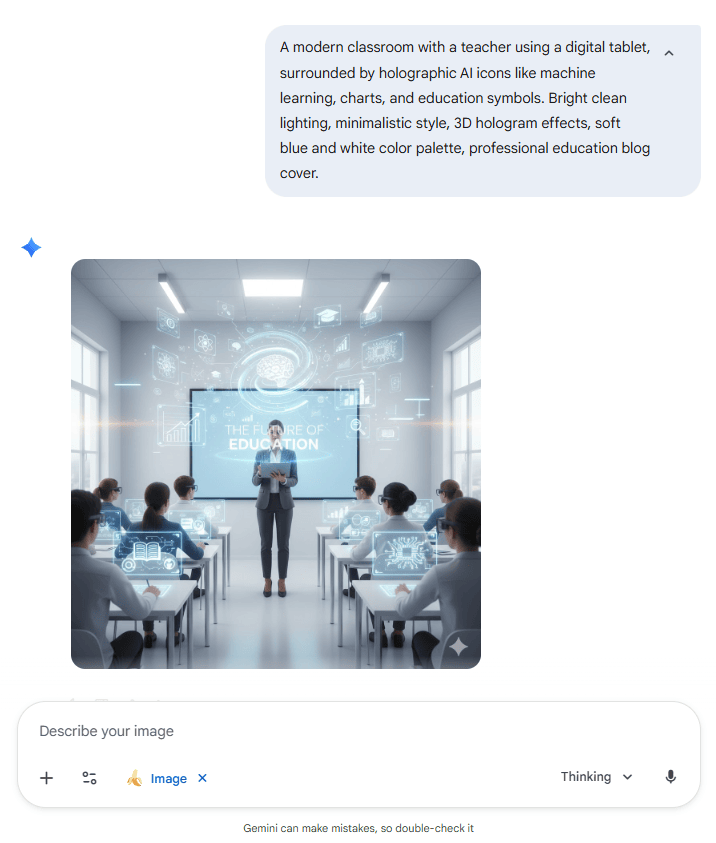
Nano Banana is the name for Google DeepMind’s AI‑powered image generation and editing technology that’s part of the Gemini family of models. It’s essentially a text‑to‑image and image‑editing AI.
Nano Banana produced an impressive visual from the input prompt. The overall effect and composition are basically in line with the prompt, but the size does not match the “blog cover”.
💡 What else can Nano Banana do?:
- Edit images by drawing directly on them and adding specific text instructions.
- Easily transform the "vibe" by adjusting lighting, camera angles, and focus.
- Apply textures, colors, and aesthetics from any reference photo to your subject.
- Instantly adapt images to any format or aspect ratio without cropping out important details.
- Create logos and posters with clear, professional text in multiple languages.
😊Pros
- Focus on realistic images and strong text-in-image rendering
- Integrated into Google’s Gemini assistant and AI Studio.
- Edit existing photos conversationally with relatively natural language prompts.
😑Cons
- Output quality depends heavily on prompt specificity.
- Occasional factual and textual errors.
- Download image contains watermark.
Can Nano Banana Create Slide❓ How to Use Nano Banana Pro to Create Presentation
8. Best AI Tools for Productivity in Video and Editing
Invideo is a browser‑based tool that lets you create marketing videos, social media content, YouTube videos, explainers and more using templates, AI, and a drag‑and‑drop editor.
We tested InVideo by entering the prompt “Create a 2-minute video about A Magical Day in Barbie’s Dream Castle.”
The entire generation process took about seven minutes, including script creation, stock media selection, and editing. The automatic voiceover fit Barbie’s character well, and the visuals also match the theme. Though some clips felt slightly inconsistent due to mixed stock sources.

💡 Key Features:
- Uses ChatGPT-like logic to write your video dialogue or narration.
- Access to 8 million+ images and videos (from sources like iStock and Shutterstock).
- Transcribes your video and adds stylized captions automatically.
- Instantly adapt images to any format or aspect ratio without cropping out important details.
- Allows teams to edit the same project together in the cloud.
😊Pros
- Intuitive and beginner-friendly interface.
- Wide variety of templates and stock media
- Supports multiple export formats and resolutions.
😑Cons
- Free plan has watermarks on videos.
- Limited edit options compare with professional sofeware.
- The video generation process is rather slow.
- Free: 2 Video mins and 1 AI credit per week, 1 Express avatar, 4 Exports per week with watermark.
- Plus: $35/month
- Max: $60/month
- Generative: $120/month
- Team: $999/month
Synthesia is an AI video generation platform that allows you to create professional videos featuring “talking heads” simply by typing text.
Traditionally, making a professional video with a person speaking requires a camera, a studio, an actor, a microphone, and hours of editing. Synthesia replaces that entire physical process with artificial intelligence.
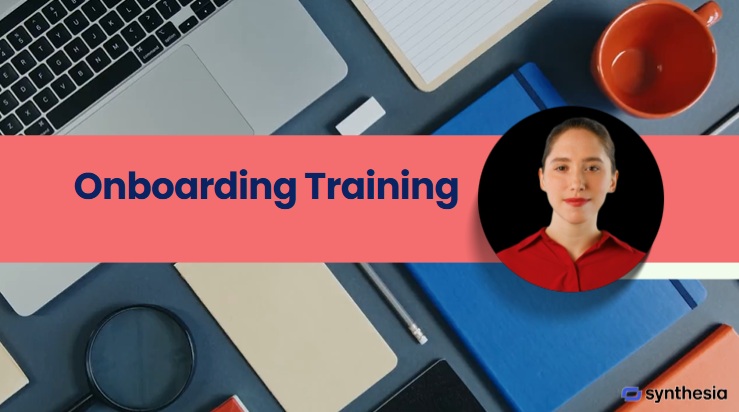
Output effect: We tested Synthesia by creating a short training video using a simple text script. The AI voice was clear and natural, and the lip-sync matched the speech very well. However, the gestures felt slightly unnatural in some scenes.
💡 Key Features:
- Convert text to voice in multiple lnguages.
- Synthesia offers over 150+ diverse avatars from professional suits to casual wear.
- Access to 8 million+ images and videos (from sources like iStock and Shutterstock).
- Translate video into 120+ languages.
- Convert slides to video.
😊Pros
- Coustom avatars by yourself.
- Adjust emotion AI voice tone.
- Easy operation like PowerPoint.
😑Cons
- Less creative freedom compared to filmed videos
- Page response speed is slow at peak time.
- Video comes with watermark in free plan
- Basic: Free (10 miuntes of video /month)
- Starter: $29/month
- Creater: $89/month
9. AI-Poweredvity Tools for Social Media Management
Hootsuite is a social media management platform that helps individuals, teams, and businesses manage multiple social media accounts in one place.
Supported Platforms:
- Facebook & Instagram (Posts, Stories, Reels)
- X (formerly Twitter)
- LinkedIn (Profiles and Pages)
- TikTok
- YouTube
- Threads
- …
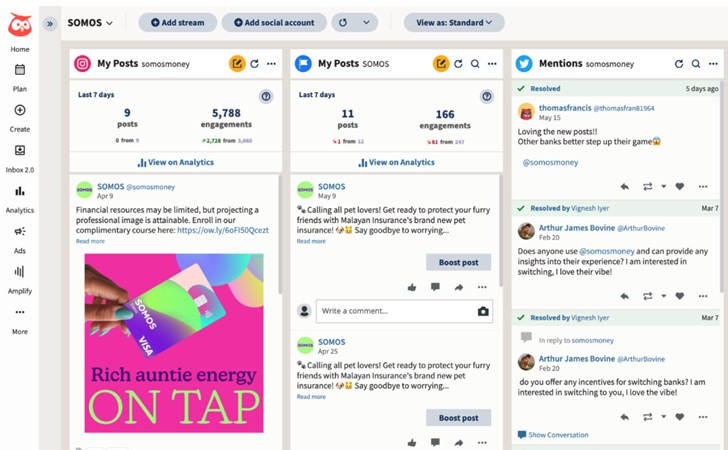
What impressed me the most was Hootsuite’s ability to recommend the best time to post based on real audience data rather than guesswork. Analyzing when followers are most active on each platform, it helps maximize reach and engagement with minimal effort.
💡 Core Features:
- Schedule posts to be published automatically at specific times
- Gather all Comments, mentions, and messages from different platforms in one box.
- Provides data on post performance, such as reach, engagement, and follower growth.
- Track keywords, brand mentions, and trends to help you identify what content works best.
😊Pros
- Centralized management of many social platforms
- Strong scheduling and planning tools.
- Good collaboration features for teams
😑Cons
- 30‑day free trial requires a credit card.
- Subscription price is high and may not suit individuals or small businesses.
- Standard: $149/month
- Advanced: $249/month
Metricool is an all-in-one social media analytics, scheduling, and ad management tool. While other tools focus heavily on just “posting,” Metricool focuses on Data.
Metricool felt practical and easy to work with for daily social media management. The dashboard was clean, and key performance data was easy to understand without needing to dig through menus. Scheduling and tracking posts worked smoothly, though some analytics updates were slightly delayed.
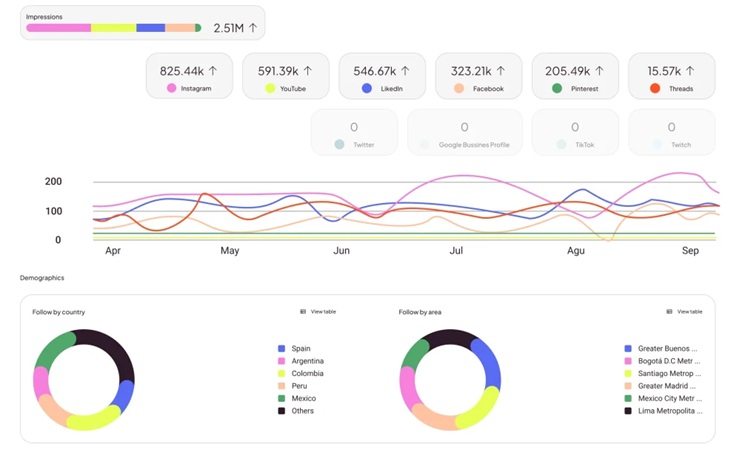
Overall, Metricool is a cost-effective tool that works best for users managing a small number of brands and who prefer a simple, straightforward workflow without complex operations or heavy setup.
💡 Core Features:
- Clear and organized data analysis to guide your decisions.
- Analyze interested competitions to adjust your media strategy.
- Build custom reports in Looker Studio with data from multiple sources.
- Track hashtag performances with real-time insights.
- Manage Google Ads, Facebook Ads, and TikTok Ads.
😊Pros
- A perpetual free tier lets you manage a single brand.
- A clean and organized dashboard is easy for beginners.
- Handling multiple brands feels organized because each space has its own profiles.
😑Cons
- Some data takes time to sync.
- Analytics reports are pages of data rather than summaries and analyses.
- Mobile app is not as powerful as the desktop interface.
- Free: Only manage 1 brand
- Starter: $22/month
- Advanced: $54/month
💬 Conclusion:
As we’ve seen, the best AI productivity tools of 2026 are those that fade into the background while significantly amplifying your output. By automating routine tasks and enhancing your creative capabilities, these tools allow you to focus on high-level strategy and deep work. Remember, technology is a lever, but you are the driver.
