
Teaching today is more demanding than ever. Teachers need to prepare lessons, create slides, grade assignments and communicate clearly with students and parents. AI tools are becoming powerful assistants that help teachers save time and focus more on teaching.
In this guide, we introduce 10+ best AI tools for teachers in 2025, covering lesson planning, content creation, grading, language teaching, and special education.
1. Best Overall AI Tools for Teachers
1.1 WorkPPT AI
WorkPPT is an all-in-one AI presentation tool that helps teachers turn ideas, outlines, or teaching materials into complete slide decks in seconds. It also includes AI tools for PDF handling, summarization, mind mapping, and AI chat, making it especially useful for lesson preparation and content organization.
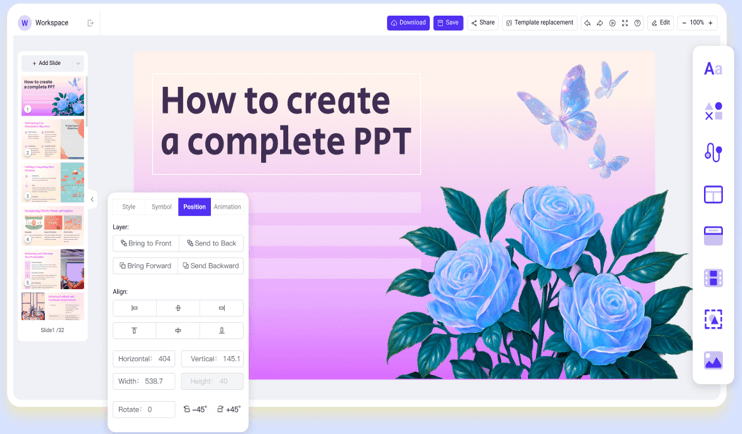
For teachers, WorkPPT works like a smart assistant for lesson slides and teaching materials, reducing both design effort and prep time.
Key Features for Teachers
- AI Sldides Generator: Teachers can turn text, documents, or images into a designed lesson presentation in seconds.
- AI Summarizer: Summarizes long teaching materials or readings (PDF, DOCX, TXT, links) into concise key points for lesson slides or study guides.
- AI Mind Map: Generates clear, logical mind maps from a topic to help teachers organize lesson structure or explain complex concepts visually.
- AI PDF Tools: Supports merging, splitting, converting, and marking PDFs, making it easier to manage worksheets, readings, and teaching files.
- AI Chat: Acts as a teaching assistant to answer questions, brainstorm lesson ideas, or help refine teaching content.
1.2 ChatGPT

- Lesson Planning: Generates structured lesson plans, objectives, and teaching activities based on grade level and subject.
- Content Creation: Creates worksheets, quizzes, tests, and slides content in seconds, with adjustable difficulty levels.
- Concept Explanation: Explains complex topics in clear, simple, and age-appropriate language for better student understanding.
- Language & Writing Support: Assists with writing prompts, grammar explanations, reading materials, and ESL instruction.
- Assessment Support: Helps design formative and summative assessments, including rubrics and feedback comments.
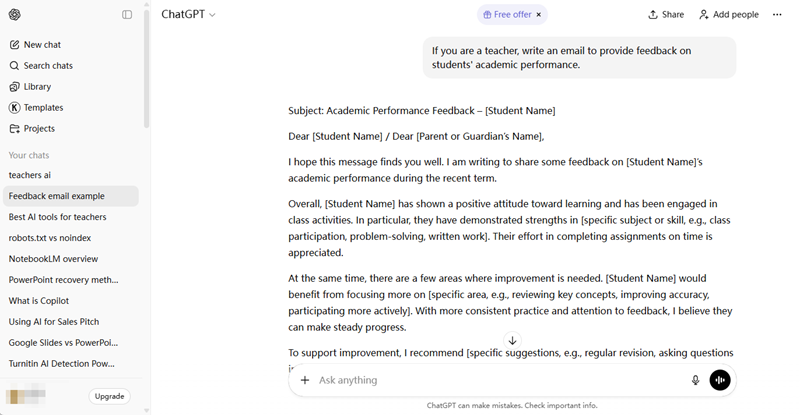
- Classroom Communication: Drafts emails, announcements, syllabi, and parent communication, saving administrative time.
- Creative Teaching Ideas: Provides ideas for activities, projects, discussions, and real-world learning examples.
1.3 Gemini
Gemini is Google’s AI assistant developed by Google DeepMind. It is deeply integrated with Google Workspace (Docs, Slides, Sheets, Gmail, Classroom), making it especially useful for teachers who already use Google tools in their daily teaching workflow.
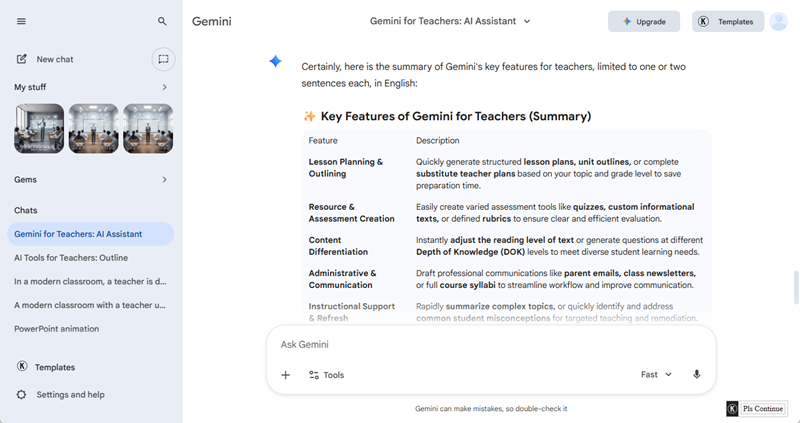
Key Features for teachers:
- Integration with Google Workspace:Works seamlessly with Docs, Slides, Sheets, Gmail, and Classroom, reducing the need to switch between tools.
- Lesson Planning & Outlining: Quickly generate structured lesson plans, unit outlines, or complete substitute teacher plans based on your topic and grade level.
- Resource & Assessment Creation: Easily create varied assessment tools like quizzes, custom informational texts, or defined rubrics to ensure clear and efficient evaluation.
- Content Creation: Creates teaching materials such as worksheets, summaries, and presentations inside Google Docs and Google Slides.
- Administrative & Communication: Draft professional communications like parent emails, class newsletters, or full course syllabi to streamline workflow and improve communication.
- Instructional Support & Refresh:Rapidly summarize complex topics, or quickly identify and address common student misconceptions for targeted teaching and remediation.
2. Best AI Lesson Plan Tools for Teachers
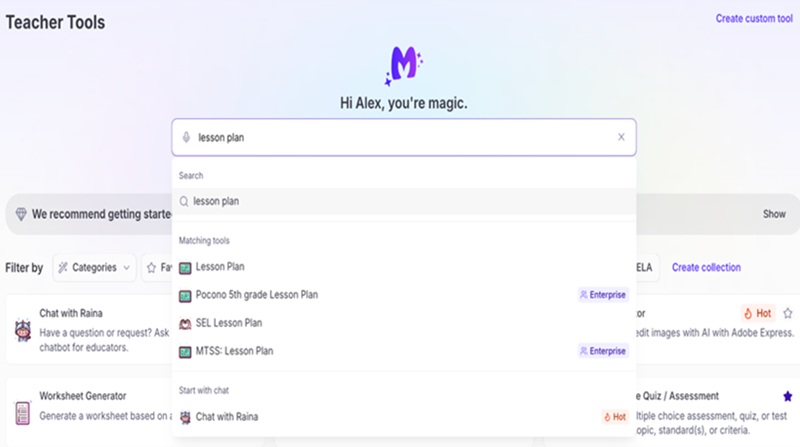
2.1 MagicSchool AI
MagicSchool AI is a leading generative artificial intelligence platform built specifically by educators for educators. Its mission is to help teachers spark creativity, save significant time, and improve student outcomes by providing a vast suite of standards-aligned, specialized AI tools.
Key Features for Teachers
- Lesson Plan Generator: Quickly creates comprehensive, standards-aligned lesson plans by inputting the topic, grade level, and specific learning objectives.
- Assessment Creation: Instantly generates various assessment tools like quizzes, worksheets, rubrics, or full assignments based on provided content or a specific topic.
- YouTube Video Tools: Automatically provides a detailed summary or creates specific guiding questions aligned to any linked YouTube video for quick integration into lessons.
- Text Leveler and Translator: Rewrites any text to a different reading level or translates it into multiple languages to ensure equitable access to content for all students.
✍ [You May Also Like]: 5 Best AI for Making Lesson Plan Slides
2.2 LessonPlans.ai
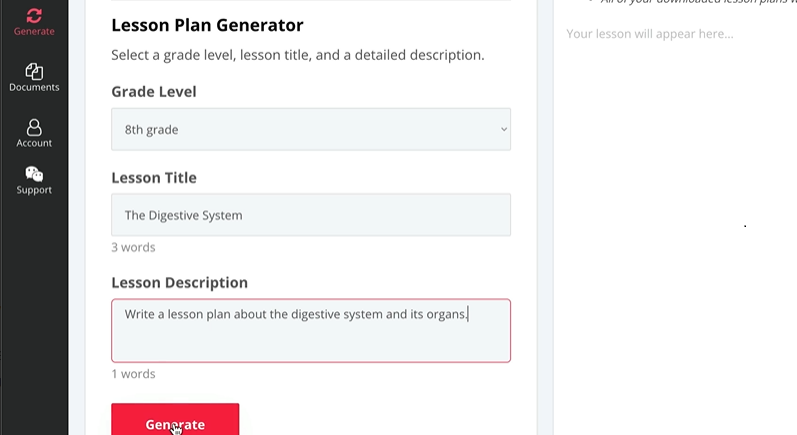
LessonPlans.ai is a specialized AI tool that focuses exclusively on generating detailed, standards-aligned lesson plans for teachers. Its purpose is to quickly automate the initial, time-consuming step of planning a lesson so educators can focus on refining and executing the instruction.
Key Features for Teachers
- Standards-Aligned Generation: Creates lesson plans that are explicitly aligned to your chosen academic standards to ensure educational relevance.
- Comprehensive Lesson Elements: Generates a complete plan including objectives, materials, procedures, assessment ideas, and differentiation suggestions based on user input.
- Built-in Customization: Offers various lesson structures or models and allows easy editing of the generated content to fit specific classroom needs.
- Multiple Subject Support: The platform supports generating plans across a wide range of grade levels and academic subjects.
3. Best AI Detection Tools for Teachers
3.1 Turnitin
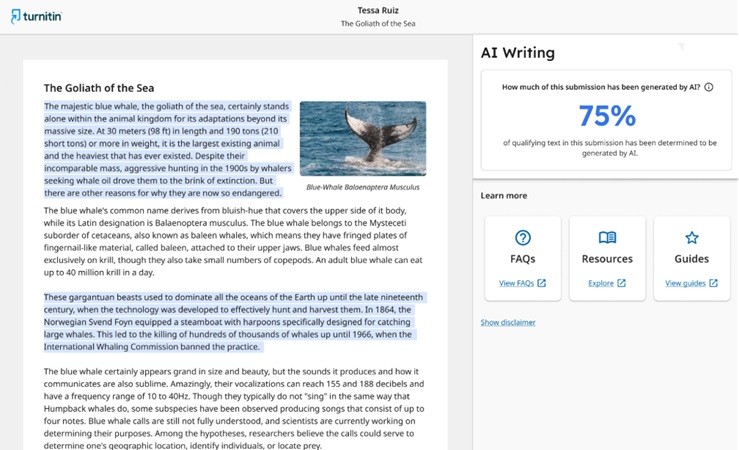
Turnitin is an academic integrity and assessment platform widely used in schools and universities. It helps teachers evaluate student work by checking for plagiarism, improper citation, and AI-generated content, while also supporting grading and feedback workflows.
Key Features for Teachers
- Plagiarism Detection (Similarity Check):Compares student submissions against a large database of academic papers, websites, and student work to identify potential plagiarism.
- AI Writing Detection: Analyzes text patterns to estimate whether AI may have generated content, helping teachers address AI use in assignments.
- Originality Reports: Provides detailed reports showing matched sources and similarity percentages, allowing teachers to review and interpret results manually.
- Assignment Management: Allows teachers to create, distribute, and collect assignments digitally within a single platform.
- Grading & Feedback Tools:Supports inline comments, reusable feedback libraries, and rubrics to speed up grading and ensure consistent evaluation.
- Revision Tracking:Tracks submission history and revisions, helping teachers see how a student’s work develops over time.
- LMS Integration:Integrates with common learning management systems, making it easy to use within existing teaching workflows.
3.2 GPTZero

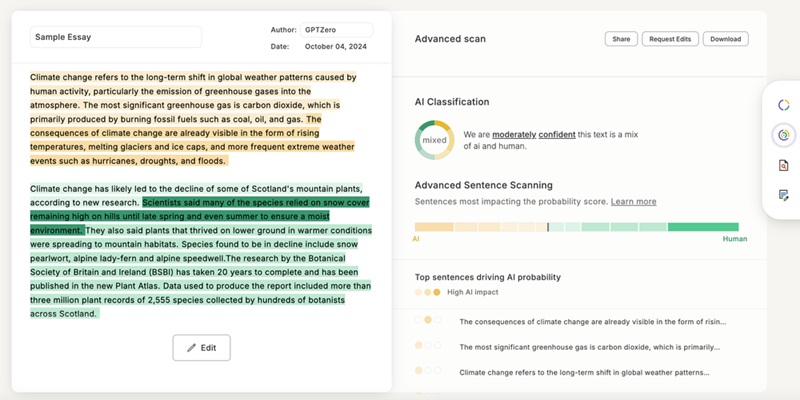
- AI Writing Detection:Analyzes student writing to estimate the likelihood that the text was generated by AI rather than written by a human.
- Sentence-Level Analysis:Highlights specific sentences that may appear AI-generated, helping teachers focus their review instead of judging the entire paper at once.
- Originality Reports:Generates reports that teachers can use to support discussions about writing process and academic honesty.
- Student Writing Process Support: Encourages transparency by helping teachers ask students about drafting, revision, and source use rather than relying only on scores.
4. Best AI Grading and Assessing Tools for Teachers
4.1 Gradescope
Gradescope is an online platform designed to streamline the entire assessment lifecycle, including grading handwritten exams, paper-based assignments, digital submissions, and coding projects. It combines the flexibility of traditional grading with the consistency and efficiency of digital tools.

Key Features for Teachers
- Grade by Question: Grade one question for all students at once, allowing for faster processing and maintaining consistent focus throughout the grading session.
- Dynamic Rubrics: Create and edit the rubric while grading, with all changes applied retroactively and instantly to all submissions to ensure perfect consistency across the class.
- AI-Assisted Grouping: For similar answers on templated assignments, the platform groups them together so you can apply the appropriate grade and feedback with a single click.
- Click-to-Apply Feedback: Quickly apply detailed feedback and points deductions by clicking rubric items instead of writing out the same comments repeatedly.
- Detailed Analytics: Automatically generate powerful statistics on question performance and common mistakes to help inform future instruction and adjust clarity.
4.2 CoGrader
CoGrader is an AI-powered platform specifically designed to act as an essay grader and feedback assistant for teachers. Its primary goal is to save educators significant time—claiming up to 80%—spent on grading written assignments while enhancing the quality and consistency of student feedback.

Key Features for Teachers
- Rubric-Based AI Grading:The AI provides instant first-pass grades and detailed feedback on written submissions, strictly follows the criteria offered by teachers.
- Customizable AI Feedback: Teachers can instruct the AI to adjust the tone, rigor, and reading level of the generated comments to ensure feedback appropriate for each student.
- Class Performance Analytics: Provides teachers with an overview of class performance to quickly identify common areas of struggle and inform future lesson planning.
- Support for Handwritten Submissions:Allows teachers to upload images of handwritten assignments for grading, making it flexible for non-1:1 device environments.
4.3 Graide
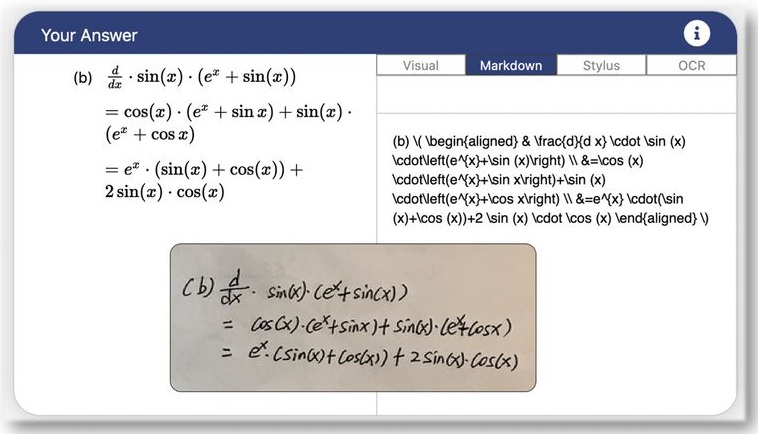
Graide is an AI-assisted assessment and feedback platform designed primarily for institutions and educators to dramatically reduce the time spent grading complex assignments while improving the quality and consistency of feedback. It is built to support a wide variety of submission types, including handwritten work and mathematical responses.
Key Features for Teachers
- Adaptive Learning of Grading Style: Graide learns how individual educators and TAs apply feedback and marks.
- Consistency and Dynamic Rubrics: It ensures grading fairness by using a shared, dynamically updating rubric.
- Support for Diverse Submissions: Teachers can upload images or PDFs of handwritten work, and the platform uses OCR and handwriting recognition to process them for grading.
- Performance Insights and Analytics: The system provides powerful class analytics, enabling teachers to identify common issues and topics of struggle in real-time to inform and adjust future teaching.
- Streamlined Multi-Staff Grading: Graide supports anonymous grading and allows for efficient assignment and management of grading tasks among multiple staff members for large cohorts.
5. Best AI Tools for Special Education Teachers
Speechify
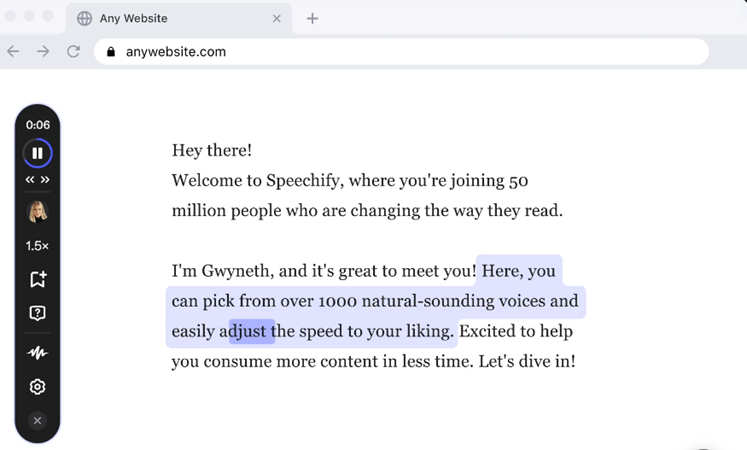
Speechify is an assistive technology tool that is highly valuable for Special Education (SpEd) teachers, as its core function is to make reading materials accessible and support students with diverse learning needs, such as dyslexia, ADHD, and visual impairments.
Key Features for Teachers
- Text Read Aloud (TTS): The tool reads any text (digital or paper) out loud, which is essential for students who struggle with reading like those with dyslexia.
- Speed and Voice Options: Users can change how fast the voice reads and choose a voice they like, customizing the tool to fit a student’s individual learning speed.
- Word Tracking: It highlights the words as they are read, helping students stay focused and easily follow along with the text.
- Works Everywhere: It can read text from any source—websites, documents, or photos—making all school materials accessible to the student.
- Boosts Learning: By reading and listening at the same time, it helps students better understand and remember what they are learning.
FAQs About Best AI Tool for Teachers
1. Are AI tools safe for teachers to use?
Most AI tools are safe when used responsibly. Teachers should avoid sharing sensitive student data and follow school or district privacy policies. It is also important to review AI-generated content before using it in class.
2. Can AI tools replace teachers?
No. AI tools are designed to support teachers, not replace them. They help reduce repetitive tasks like lesson planning and grading, allowing teachers to focus more on teaching and student interaction.
3. What is the best free AI tool for teachers?
ChatGPT is one of the most popular free AI tools for teachers. It can help with lesson ideas, explanations, quizzes, and feedback. Many other tools also offer free plans with limited features.
4. Which AI tools are best for lesson planning and presentations
WorkPPT is a practical AI tool for lesson planning and presentation creation. Teachers can generate complete slide decks from a topic, outline, or teaching notes, which helps reduce time spent on slide design and formatting.
5. Do AI tools work for all grade levels?
Yes, but the tools and use cases may vary. Some AI tools are better for K–12 classrooms, while others are more suitable for higher education. Teachers should choose tools that match their students’ age and learning needs.
💬 Conclusion:
AI is becoming an essential part of modern education. These best AI tools for teachers help reduce time spent on lesson planning, grading, and content creation, allowing educators to focus more on student learning.
📄 Text & documents to slides quickly
🧠 Powerful AI toolkits to save time
🎨 5,000+ education-ready templates
📤 Export to PPTX, PDF, or Google Slides