

The landscape of AI image generation has shifted. While Midjourney and DALL-E have long dominated the conversation, Google’s latest update to Gemini 3 Pro has introduced a new heavyweight champion: the Nano Banana Pro model.
For power users, designers, and educators, understanding how to craft the perfect Nano Banana prompt is now the most valuable skill in digital creation. This guide covers the origins of the model, why it outperforms competitors, and provides over 50 copy-paste prompts to help you master it immediately.
What is Nano Banana Pro? (The Origin Story)
“Nano Banana Pro” is the internal codename (and now widely used community term) for the sophisticated image generation engine embedded within Google’s Gemini 3 Pro.
Unlike previous iterations like Imagen 2 or the standard “fast” models, Nano Banana Pro is built on a multimodal reasoning architecture. This means it doesn’t just match keywords to pixels; it understands physics, lighting, spatial relationships, and complex text instructions. It is designed to “think” before it draws, allowing for a level of prompt adherence that was previously impossible
50+ Ways to Use Nano Banana Pro (With Prompts)
Nano Banana Pro’s standout feature is its Natural Language Reasoning. You don’t need “prompt engineering” hacks like “8k, masterpiece, highly detailed”—you just need to describe the world you want to see.
We’ve categorized these into 5 high-impact domains tailored for creators, professionals, and the curious.
A. The "Digital Identity" Series: Personal Branding 2.0
In the era of social media, your avatar is your first impression. Use these prompts to create a high-fidelity digital twin.
- The Pixar Transformation:
(Upload selfie) Convert this photo into a 3D Pixar-style character. Keep my signature glasses and curly hair. Soft cinematic lighting, 4k render. - Corporate Professionalism:
(Upload photo) A high-end LinkedIn headshot of this person in a charcoal suit. Blurred modern office background, soft natural window light, professional and approachable. - The “Sims 4” Aesthetic:
Render me as a character from The Sims 4. Standing in a minimalist kitchen with a thought bubble above my head containing a coffee icon. - Cyberpunk Persona:
(Upload photo) A futuristic cyberpunk portrait of me wearing neon-lit techwear. High-contrast lighting, rainy Tokyo street backdrop, Blade Runner aesthetic. - Vintage Polaroid:
A candid 1990s Polaroid of me laughing at an outdoor festival. Authentic film grain, slight light leak, nostalgic tones. - Hand-Drawn Illustration:
A minimal line-art portrait of me for a personal website. Clean black lines on a cream background. - Lego Minifigure:
Transform me into a custom LEGO minifigure, including my beard and the blue hoodie I’m wearing in the photo. - Fantasy Knight:
(Upload photo) A majestic oil painting of me as a medieval knight in silver armor. Dramatic chiaroscuro lighting. - Claymation Style:
A cute, tactile claymation version of this person. Bright, saturated colors, stop-motion film look. - The “Grand Theft Auto” Map:
(Upload map screenshot) Redraw this map area in the distinct illustrative style of the GTA V loading screens.
B. The "Executive Suite": Business & Workflow Automation
Stop spending hours on stock photos. Generate bespoke assets for your decks and reports.
- 11. Isometric Process Flow:
A clean 3D isometric infographic showing three stages of a project: "Insight", "Execution", "Scale". Minimalist white background, precise labels, zero spelling errors. - 12. The “Growth” Visual:
A professional data visualization of a rising bar chart. A 3D green arrow points upward. Text must read: "25% ANNUAL GROWTH". - 13. Human-AI Collaboration:
A high-quality photo of a human hand and a robotic hand shaking. Modern laboratory setting, shallow depth of field, 8k resolution. - 14. SaaS UI Mockup:
A hand holding a sleek, bezel-less smartphone displaying a beautiful dashboard for a financial app. Dark mode, vibrant accent colors. - 15. The Collaborative Office:
A wide-angle, photorealistic shot of a modern, glass-walled conference room. A whiteboard in the background says "MISSION 2026". - 16. Interactive Global Map:
A digital world map with glowing nodes and connecting data lines, symbolizing a global supply chain. Tech-blue aesthetic. - 17. Sustainability Concept:
A high-quality 3D render of a lightbulb with a thriving green ecosystem growing inside it. Sitting on a polished wooden surface. - 18. The Creative Workspace:
A flat-lay shot of a clean desk with a laptop, a coffee cup, and a notebook. The notebook has a handwritten "BRAINSTORM" header. - 19. Logistics & Delivery:
A 3D render of a cargo ship and drones flying above it, representing high-tech autonomous logistics. Sunset lighting. - 20. Market Comparison:
A split-screen visual. Left: "Legacy Systems" (messy wires). Right: "Cloud Native" (clean, glowing server).
C. The "Founder’s Toolkit": Branding & E-commerce
Use these to create instant product mockups and marketing assets for your startup.
- 21. High-End Product Photography:
A luxury glass perfume bottle on a wet basalt stone. Soft morning sunlight, water ripples, realistic refraction and reflections. - 22. Branded Apparel:
(Upload Logo) A young man wearing a high-quality white oversized t-shirt with my logo printed on the chest. Standing in a trendy Brooklyn street. - 23. Social Media Carousel Cover:
A bold typography design for a Pinterest post. Large text: "TOP 5 AI TOOLS". Vibrant, abstract liquid background. - 24. The Aesthetic Flat-Lay:
A curated flat-lay of lifestyle products for an Instagram ad: sunglasses, a leather wallet, and an espresso. Minimalist beige background. - 25. Packaging Design:
A minimalist eco-friendly cardboard box for a high-end candle. The box has a custom logo embossed on the front. Soft studio lighting. - 26. Restaurant Chalkboard:
A rustic chalkboard outside a bistro. Clear, beautiful handwriting: "TODAY'S SPECIAL: TRUFFLE PASTA - $18". - 27. Cosmetic Mockup:
A tube of luxury sunscreen sitting on a bed of sand next to a sea shell. Golden hour lighting, professional ad style. - 28. Podcast Cover Art:
A bold, modern podcast cover titled "FUTURE OF WORK". Features a 3D microphone and a gradient of neon blue and pink. - 29. Custom Totebag:
A minimalist canvas tote bag hanging on a white wall. Render a geometric leaf logo on the center. High-resolution fabric texture. - 30. App Store Visuals:
A series of three iPhone screens showing a meditation app with a calm, forest-themed user interface.
D. The "Educator’s Edge": Science & Technical Diagrams
Nano Banana Pro is a breakthrough for STEM. Its ability to label parts correctly is its greatest strength.
- 31. Anatomical Accuracy:
A detailed 3D medical illustration of the human heart. Accurately label the "Aorta", "Left Ventricle", and "Pulmonary Artery". White background. - 32. Historical Scene Restoration:
A photorealistic reconstruction of Ancient Rome at its peak. Vibrant colors, busy streets, cinematic wide shot from a high perspective. - 33. The Water Cycle:
A professional educational diagram of the Water Cycle. Include: "Evaporation", "Condensation", "Precipitation". Clear arrows and correct text. - 34. Cellular Biology:
A colorful cross-section of a plant cell. Visible parts: Cell Wall, Nucleus, Chloroplasts. Accurate and labeled. - 35. The Physics of Motion:
A photorealistic illustration of a Newton’s Cradle in motion. Silver balls, sharp focus on the impact point, dark background. - 36. Space Exploration:
A view from the window of a Mars colony habitat looking out at a red dusty landscape. A rover is visible in the distance. - 37. Chemical Structures:
A 3D ball-and-stick model of a Caffeine molecule. Glossy materials, laboratory lighting. - 38. The Solar System:
A scale model of our solar system on a dark, starry background. Accurate planet sizes and colors. - 39. Literary Visualization:
A moody, Victorian-era London street scene to illustrate a Charles Dickens novel. Foggy, cobblestone streets, gas lamps. - 40. Mathematical Concepts:
A 3D visualization of a Fibonacci Spiral found in a seashell. Golden ratio proportions, macro photography.
E. The "Creative Sandbox": Physics-Defying Logic
Push the reasoning model to its limits with scenarios that usually break AI.
- 41. The Impossible Drink:
A glass of water filled exactly to the brim, with a slight surface tension bulge. A clear reflection of a red apple on the water's surface. - 42. Miniature Worlds:
A tiny, lush rainforest growing inside a glass lightbulb. Macro photography, high detail, bokeh background. - 43. Fruit Tech:
A hyper-realistic MacBook Pro made entirely out of carved orange peel. Creative and surreal product photography. - 44. Submerged Music:
A grand piano sitting at the bottom of a clear turquoise ocean. Rays of sunlight piercing through the water, tropical fish swimming around. - 45. Paper Cut Art:
A layered paper-cutout art piece of a mountain range. Different shades of blue paper, visible shadow depth between layers. - 46. The Cloud Zoo:
A bright blue sky with fluffy white clouds shaped exactly like a lion and an elephant. Realistic cloud texture. - 47. Steampunk Nature:
A mechanical butterfly made of brass gears, clock parts, and glowing copper wires. Resting on a metallic flower. - 48. Double Exposure:
A double exposure portrait of a man’s silhouette blended with a dense, misty pine forest. - 49. Architecture in a Bottle:
A miniature glass bottle containing a detailed model of the Eiffel Tower and a small Parisian street. - 50. Vaporwave Sculpture:
A white marble bust of a Greek god wearing pink neon sunglasses. Glitch art background, 80s aesthetic.
How to Start: Activating the "Thinking" Model
To use a Nano Banana prompt effectively, you must ensure you are using the correct model setting.
- 1. Open gemini.google.com or the Gemini App.
- 2. In the model selector, ensure you are using Gemini 3 Pro (or “Thinking” model).
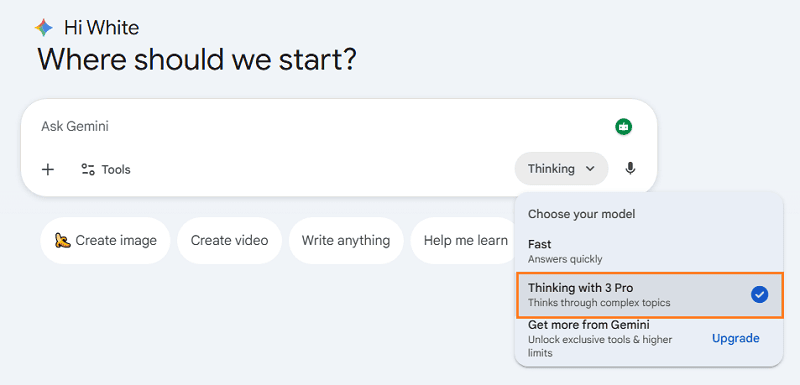
- Crucial Step: Do not ask for “fast” images. Speed often triggers the lower-quality model.
- Structure your prompt:
[Role] + [Subject] + [Detailed Visual Context] + [Style/Lighting] + [Text Requirement]
Nano Banana vs. Midjourney: Why Switch?
Why are creators migrating to Gemini to use this model? It comes down to three specific features where a well-structured Nano Banana prompt beats the competition:
A. The 14-Reference Image Workflow
Midjourney allows for image referencing, but Nano Banana Pro takes it a step further. You can upload up to 14 reference images in a single prompt.
- The Benefit: This is a game-changer for Character Consistency. You can upload 10 photos of a specific person or product from different angles, and the model will generate new scenarios while keeping the subject’s identity 100% consistent.
B. Perfect Text Rendering (Typography)
The “spaghetti text” era is over. Nano Banana Pro has achieved near-zero error rates in spelling.
- The Benefit: You can generate logos, posters, infographics, and diagrams where the text is legible and correctly spelled, even in multiple languages.
C. Physics and Reasoning
Because the model is part of Gemini 3 Pro, it possesses logical reasoning.
- The Example: If you ask for a “glass of wine filled to the brim with a reflection of a burger,” standard models fail. Nano Banana Pro understands the physics of liquid tension and refraction, rendering the scene accurately.
Nano Banana vs. Midjourney: Why Switch?
Writing a perfect Nano Banana prompt takes time. You have to define the lighting, the style, the text, and the aspect ratio.
WorkPPT solves this by acting as an intelligent “Prompt Wrapper” for your presentations.
Instead of typing:
“Create a 16:9 infographic about Q4 Sales growth, use corporate blue, flat vector style, white background, ensure text says ‘Growth’…”
In WorkPPT, you simply type:
“Make a slide about Q4 Sales Growth.”
How it works: WorkPPT’s engine automatically engineers a high-fidelity Nano Banana prompt in the background. It injects the necessary parameters for:
- Brand Consistency: Automatically applying your color palette.
- Slide Layout: Forcing the AI to leave “white space” for your text content.
- Visual Logic: selecting the right chart type or metaphor (e.g., an upward arrow) without you needing to ask.
It is the fastest way to leverage the power of Nano Banana Pro without becoming a prompt engineer yourself.
FAQs About Best AI Tool for Teachers
Can I use Nano Banana prompts in the standard Gemini window?
Why does my text still look gibberish sometimes?
Can I use Nano Banana Pro images for commercial use?

📄 Text & documents to slides quickly
🧠 Powerful AI toolkits to save time
🎨 5,000+ education-ready templates
📤 Export to PPTX, PDF, or Google Slides

