


Creating clear, professional, and engaging PowerPoint presentations can be challenging. The 6×6 PowerPoint rule is a simple guideline that helps presenters make slides easier to read and more effective. In this article, we’ll break down 6×6 rule and show you how to apply it.
What Is the 6x6 Rule in PowerPoint?
The 6×6 rule is a design guideline for creating slides that are easy to read. It suggests that each slide should contain:
- No more than 6 lines of text
- No more than 6 words per line
The goal is to keep slides concise, letting your audience focus on your speech rather than reading long paragraphs. This rule is especially useful for business presentations, educational slides, and pitch decks where clarity is essential.
Create Perfect 6×6 Slides in Seconds
Simple enter the topic or upload files and get a clear presention from WorkPPT.
Benefits of Using the 6x6 Rule in PowerPoint Presentations
Using the 6×6 rule offers several advantages:
1. Improved Readability: Slides with fewer words are easier to scan.
2. Audience Focus: Helps viewers pay attention to the speaker instead of reading dense text.
3. Reduced Cognitive Overload : Simplifies information, making it easier to remember key points.
4. Professional Appearance: Well-organized slides look polished and visually appealing.
5. Faster Slide Creation: Limiting text encourages you to summarize ideas effectively.
By following this simple rule, you can make your presentation more engaging and impactful.
How to Use the 6x6 Rule in PowerPoint
Applying the 6×6 rule is straightforward. Here’s a step-by-step guide:
Limit Text to 6 Lines Per Slide
- Each slide should focus on one main idea.
- Avoid cluttering slides with multiple paragraphs.
Keep Each Line Under 6 Words
- Use short, clear phrases instead of full sentences.
- Use keywords that convey your main points.
Use Visuals to Replace Text
- Charts, icons, and images can convey complex ideas more effectively than words.
- Infographics help summarize information at a glance.
Maintain Consistent Formatting
- Keep font size large enough to read from a distance.
- Align text neatly and use bullet points for clarity.
Test Your Slides
- Preview slides in presentation mode to ensure readability.
- Ask a colleague or friend to see if the main points are clear.
Before you type anything, ask yourself: “What is the one thing I want the audience to remember from this slide?” Every slide should have only one main idea.
✍ [You May Also Like]: How Many Words for a 10-Minute Speech?
6x6 Rule PowerPoint Example
Take a look at the slides below. Which one do you think is easier to read and understand at a glance?

This slide contains long sentences and too many points on a single slide. It is hard to read quickly, and the audience may struggle to focus on the main message.

This slide follows the 6×6 rule, keeping each line short and limiting the total number of lines. Key points are easy to scan, making the slide clean, professional, and audience-friendly.
6x6 or 7x7 PowerPoint Rule: Which One Should You Use?
Another common rule is the 7×7 rule, which allows 7 lines per slide and 7 words per line.
| Rule | Maximum Lines per Slide | Maximum Words per Line | Best Use Case |
|---|---|---|---|
| 6×6 Rule | 6 | 6 | Clear, concise slides; short presentations; business and educational decks |
| 7×7 Rule | 7 | 7 | Slides needing slightly more text; technical content; slightly longer explanations |
Tip: Use the 6×6 rule for most slides to maintain clarity and audience engagement. Consider 7×7 only if you need slightly more content without overwhelming the audience.
How Can You Apply 6x6 Rule Effortlessly
After learning how to apply the 6×6 rule, you might wonder how to create professional slides quickly without spending hours formatting text. WorkPPT is an AI-powered presentation tool designed to turn your ideas or files into complete slides in seconds.
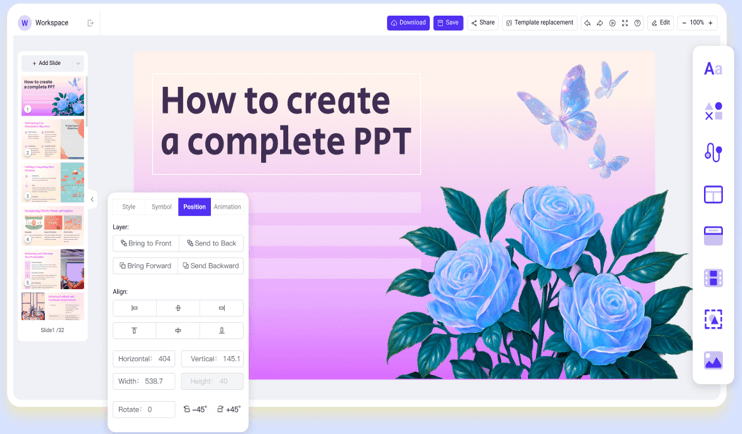
With WorkPPT, applying the 6×6 rule becomes effortless. The AI ensures that each slide is concise, visually clear, and audience-friendly, so you can focus on delivering your message rather than spending hours on design.
⭐⭐⭐⭐⭐ Rated 4.8 by 1.3M Users
FAQs About 6x6 Rule in PowerPoint
Q1: How can I apply the 6x6 rule effectively?
A: Focus on one idea per slide, limit text, use visuals to replace words, and keep formatting consistent.
Q2: How can I apply the 6x6 rule effectively?
A: What is the difference between 6×6 and 7×7 PowerPoint rules?
Q3: Are there exceptions when the 6x6 rule shouldn’t be used?
A: Yes. Charts, tables, complex diagrams, or training materials may require more text. In those cases, prioritize clarity and readability over strict adherence.
Q4: Are there any tools to create slides following the 6x6 rule?
A: Yes! WorkPPT is an AI-powered presentation tool that can automatically generate slides following the 6×6 rule. Simply enter your ideas or upload a document, and WorkPPT will structure and design clear, professional slides for you
💬 Conclusion:
The 6×6 rule in PowerPoint is a simple yet powerful guideline for creating clear, concise, and professional slides. Try tools like WorkPPT AI PPT maker, you can quickly turn your ideas into well-designed slides that follow the 6×6 rule, allowing you to focus on your content and delivery rather than formatting.
