


Staring at a blank PowerPoint screen is the biggest hurdle in presentation design. Using an AI prompt for powerpoint presentation allows you to turn a simple idea into a professional slide deck in seconds. By providing clear instructions to an AI PPT maker, you can skip hours of manual formatting and content writing.
In this guide, you will learn how to write the perfect prompt, explore free examples for different industries, and discover how to use a presentation prompt generator to automate your workflow.
Part 1: AI Prompts Basics for Presentations
An AI prompt is the “bridge” between your idea and a finished slide. If you give the AI a vague instruction, you get a generic result. If you give it a structured prompt, you get a presentation that looks like it was made by a professional designer.
What is a Prompt in a Presentation?
Think of a prompt as a detailed recipe. Instead of just saying “make a cake,” you tell the baker “make a 3-layer chocolate cake for a 10th birthday party with 20 guests.” In the world of PowerPoint, an AI prompt for presentation includes your topic, your target audience, the tone of voice, and the number of slides you need.
Why Use AI PPT Maker Instead of Just ChatGPT?
While you can use ChatGPT prompts for PowerPoint presentations to get text, ChatGPT cannot design the slides for you. Best AI PPT maker takes it a step further. It doesn’t just write the bullet points; it selects the layout, matches the color scheme, and places images.
Using a dedicated tool saves you from the “copy-paste” fatigue of moving text from an AI chat into a PowerPoint file.
Part 2: Step-by-Step AI Prompt Tutorial
Writing an effective prompt follows a “Formula of Four”: Topic + Audience + Goal + Style. If you include these four elements, the AI will produce high-quality slides on the first try without needing constant revisions.
Step 1: Define Your Topic (The "What")
Be specific. Instead of “Market Trends,” use “Consumer Tech Market Trends in Southeast Asia for 2026.”
Step 2: Identify Your Audience (The "Who")
The tone for a group of kindergarten teachers is very different from the tone for a board of directors. Mentioning the audience helps the AI adjust the vocabulary and complexity.
Step 3: State Your Goal (The "Why")
Are you trying to sell a product, teach a lesson, or report quarterly earnings? Clearly stating “The goal is to persuade investors to fund our startup” ensures the AI uses persuasive language.
Step 4: Choose Your Style (The "Look")
This is where you use ai prompt tutorial techniques to define the visual vibe. Keywords like “Minimalist,” “Corporate Blue,” “High-energy,” or “Academic” help the AI choose the right template.
Pro Tip: What to Say Before a Presentation You can even ask the AI to write your opening script. Try adding this to your prompt: “Include a catchy hook for the opening slide that explains why this topic matters right now.”
Part 3: Best AI Prompt Examples for Presentation Generation
The quality of your slides depends entirely on the specificity of your prompt. While AI is smart, it cannot guess your unique goals. By using industry-specific prompts, you can ensure the content is relevant, the tone is appropriate, and the structure makes sense for your audience.
Below is a comprehensive library of AI prompts for presentation examples categorized by field. You can copy these directly into WorkPPT AI prompt to PPT to generate full decks in seconds.
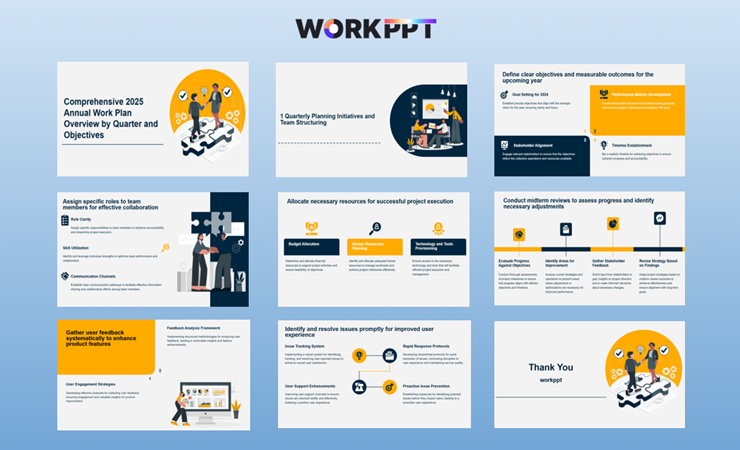
Sales pitch deck template from WorkPPT
Category 1: Technology and Innovation
Use these prompts to simplify complex technical concepts into digestible slides for both experts and beginners.
- AI Trends 2025: “Create a professional presentation on the top 5 AI trends for 2025. Include slides on generative video, AI agents, and ethical AI. Tone: Forward-thinking.”
- Cybersecurity Basics: “Develop an 8-slide deck for non-technical employees about phishing and password safety. Style: Clean and corporate.”
- The Future of Robotics: “Generate a presentation about how humanoid robots will change the manufacturing industry by 2030.”
- Green Tech Innovations: “Create a pitch deck for a startup focused on hydrogen fuel cells for public transport.”
- Introduction to Metaverse: “Explain the concept of the Metaverse to retail business owners, focusing on virtual storefronts.”
- Cloud Migration Strategy: “Outline the 5 steps for a mid-sized company to move from on-premise servers to the cloud.”
- SaaS Product Demo: “Create a slide deck for a project management software launch, highlighting the ‘automation’ and ‘reporting’ features.”
- The Impact of 5G: “Design a presentation on how 5G technology will enable the growth of Smart Cities.”
- Biotech Breakthroughs: “Summarize the latest advancements in gene editing for a medical conference. Tone: Academic.”
- Data Privacy Laws: “Outline the key differences between GDPR and CCPA for a legal compliance team.”
Category 2: Business and Marketing
- Digital Marketing Strategy: “Create a 10-slide strategy for a local bakery to increase Instagram engagement by 50%.”
- Quarterly Sales Review: “Generate a template for a Q4 sales report, including slides for ‘Wins,’ ‘Losses,’ and ‘Forecast for Next Year’.
- Brand Identity Pitch: “Develop a presentation proposing a new brand identity (minimalist and luxury) for a boutique hotel.”
- Investor Pitch Deck: “Create a compelling 12-slide pitch for a fintech app targeting Gen Z. Focus on the ‘Pain Point’ and ‘Scalability’.”
- Competitor Analysis: “Compare the top 3 players in the e-commerce industry. Use a SWOT analysis layout for each.”
- Customer Persona Profile: “Visualize 3 different customer personas for a high-end electric vehicle brand.”
- Influencer Campaign Proposal: “Outline a 3-month influencer marketing plan for a new skincare line.”
- Content Calendar Strategy: “Create a presentation for a marketing team showing how to repurpose one blog post into 10 social media snippets.”
- Market Entry Plan: “Analyze the risks and opportunities of expanding a coffee chain into the Southeast Asian market.”
- Employee Referral Program: “Design an internal deck to encourage employees to refer new talent, highlighting the bonus structure.”
Category 3: Education and Public Awareness
Focus on storytelling and clarity to ensure your message is remembered long after the presentation ends.
- Climate Change Awareness: “Create a moving presentation on the impact of melting glaciers on global sea levels. Use emotional imagery.”
- The History of Space Travel: “Generate an educational deck for middle schoolers starting from the Moon Landing to Mars exploration.”
- Financial Literacy for Teens: “Explain the ‘Power of Compound Interest’ using simple analogies and 5 clear slides.”
- Ocean Plastic Crisis: “Outline the journey of a plastic bottle from a city street to the Great Pacific Garbage Patch.”
- Ancient Civilizations: “Create a visual comparison between Ancient Rome and Ancient Greece in terms of government and art.”
- Public Speaking Tips: “Design a slide deck for a student workshop on ‘How to Overcome Stage Fright’.”
- The Science of Nutrition: “Explain the role of macronutrients (carbs, proteins, fats) in a balanced diet for athletes.”
- Sustainable Fashion: “Highlight the environmental cost of ‘Fast Fashion’ and offer 5 ways to shop more sustainably.”
- Cyberbullying Prevention: “Develop a guide for parents on how to keep kids safe on social media platforms.”
Category 4: Professional Development & HR
Use these to build a better company culture and streamline internal training.
- Remote Work Productivity: “Create a presentation on the best tools and habits for staying productive while working from home.”
- Leadership Training: “Outline the ‘5 Levels of Leadership’ for a management training seminar. Tone: Inspirational.”
- Conflict Resolution: “Develop a step-by-step guide for HR to handle disputes between team members.”
- Diversity and Inclusion: “Create an educational slide deck on ‘Unconscious Bias’ and how to mitigate it in hiring.”
- New Hire Onboarding: “Generate a 6-slide ‘Welcome to the Team’ deck covering mission, values, and first-week expectations.”
- Time Management Hacks: “Explain the Pomodoro Technique and Time Blocking to a group of busy executives.”
- Public Relations Crisis Plan: “Outline a 24-hour response plan for a company facing a social media PR crisis.”
- Emotional Intelligence (EQ): “Explain why EQ is more important than IQ for modern managers. Include 3 practical exercises.”
- The Art of Feedback: “Teach managers how to give ‘Radical Candor’ feedback that is both kind and direct.”
- Corporate Wellness Program: “Propose a ‘Wellness Wednesday’ initiative involving yoga, meditation, and healthy snacks.”
Category 5: Prompts for Specific Slide Needs
- For Ideas: “Give me 5 creative presentation titles for a speech about the future of work.”
- For Outlines: “Create a logical 7-slide outline for a presentation about ‘The Benefits of Veganism’.”
- For Headlines: “Rewrite this headline to be more ‘hooky’: ‘Our Company Sales are Growing’.” (AI might suggest: ‘Record-Breaking Growth: How We Doubled Sales in 6 Months’).
- For Visuals: “Suggest a background image style for a slide about ‘Peace and Meditation’.”
- For Data: “Create a slide summarizing these numbers: $1M revenue, 20% growth, 50 new clients.”
- For Closings: “Write a powerful closing slide that encourages the audience to sign up for our newsletter.”
Part 4: Tips and Tricks for Pro Results
To get the best results, treat the AI like a talented intern: give clear feedback and iterate. Even the best ai prompt for powerpoint presentation might need a little tweaking to be perfect.
- The “One Topic per Slide” Rule: If the AI is cramming too much info onto one slide, update your prompt to say: “Keep text concise; use no more than 4 bullet points per slide.”
- Iterate for Perfection: If the first draft is too formal, don’t start over. Just tell the AI: “Make the tone more conversational and add a relatable example to slide 3.”
- Use Visual Keywords: To improve the images the AI suggests, use specific descriptors like “flat illustration,” “isometric design,” or “cinematic photography.”
- Check the Flow: Use the “What to say before” trick for every slide. Ask the AI to: “Provide a transition sentence for the presenter to move from Slide A to Slide B.”
FAQs about AI Presentation Prompts
What is the most important element of a good prompt?
Defining the Audience. Knowing who you are talking to (investors, students, executives, or colleagues) allows the AI to correctly adjust the tone, vocabulary, complexity, and level of detail, making the presentation much more effective.
What's the best prompt length?
Defining the Audience. Knowing who you are talking to (investors, students, executives, or colleagues) allows the AI to correctly adjust the tone, vocabulary, complexity, and level of detail, making the presentation much more effective.
Do I need to fact-check the content the AI generates?
There is no single “best” length, but clarity is more important than word count. A good prompt usually falls between 50 and 150 English words (or the corresponding content volume in other languages).
How can I ensure the AI-generated slides are high-quality and not generic?
The quality is directly related to your prompt’s specificity.
- Be Specific: Instead of “Presentation on Marketing,” use “10-slide strategy deck for a C-suite audience about Q4 B2B content marketing performance.”
- Define Style: Add keywords like “Minimalist,” “Corporate Blue,” “Storytelling focus,” or “Heavy on Infographics.”
- Review and Refine: Always treat the AI output as a high-quality first draft. Review the facts and personalize the content with your own stories and insights.

