

How to Create a Marketing Strategy PPT? 3 Minutes from Zero to Pro
I’ve built dozens of marketing strategy PPTs for B2B teams, founders, and internal reviews. Most people overthink it — or worse, copy random slides that look good but say nothing.
In this guide, I’ll show you how I create a clear, business-ready marketing strategy PPT, what slides actually matter, and how to avoid common mistakes. I’ll also share real examples, AI prompts, and template resources you can use right away.
A marketing strategy PPT shows how a business plans to win customers and grow revenue. In simple terms, marketing strategy is about understanding the market, how to attract customers, and drive growth.
It is not a list of marketing tactics. It is a decision document for managers, founders, and stakeholders.
Research: – market demand, audience behavior, competitors, and pricing signals
Promotion: – how the strategy is executed across channels and experiences
Research: – market demand, audience behavior, competitors, and pricing signals
Measurement: – how results are tracked, learned from, and optimized
At its core, a marketing strategy answers four simple questions: Who is buying your product or service? Why they choose to take action? Who you are competing with? How success is measured and improved?
If these questions are clear, the slides work. If not, even polished decks fail.
A company’s marketing strategy usually covers:
Recommended Slide Structure
A well-structured marketing strategy PPT should flow logically, like a story:
Market Overview: Current trends, opportunities, and challenges.
Competitive Analysis: Who else is targeting this market and how they position themselves.
Target Audience Definition: Clear personas or segments with real business relevance.
Strategy Breakdown: Key approaches such as digital marketing, content, partnerships, or offline campaigns.
Execution Plan: Timeline, priorities, and resource allocation.
Metrics & Success Criteria: How results will be measured and optimized.
Each section should naturally lead into the next, helping the audience follow your thinking without effort.
Hack to Create a Marketing Strategy Presentation in 2 Minutes with AI
I used to build slides manually. Now I don’t — unless I have to.
My Workflow Using WorkPPT AI PPT Maker
I currently recommend WorkPPT AI for speed and structure. It supports:
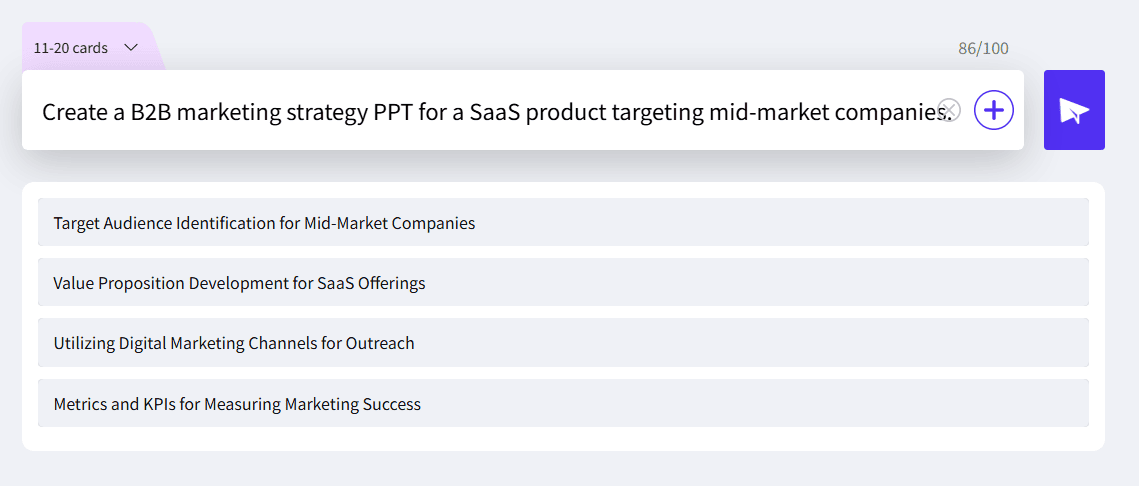
This turns a rough idea into a usable marketing strategy PPT in minutes. AI won’t replace thinking — but it speeds up structure. Here’s a prompt I used: “Create a B2B marketing strategy PPT for a SaaS product targeting mid-market companies.” and I get an perfect outline in few seconds:
If you don’t want to use AI marketing strategy PPT maker, then you might need marketing strategy templates. Here are some free template download sites:
Avoid generic “creative” templates. Strategy slides need clarity, not decoration.
Common Mistakes in Marketing Strategies PPT Slides
I see these mistakes constantly:
Too many channels, no priority
Slides describe actions, not strategy
No clear target audience
Metrics are missing or vague
If your marketing strategies PPT slides don’t force decisions, they’re just noise.
FAQs About Marketing Strategy Presentation
Is a Marketing Strategy PPT the Same as a GTM PPT?
No. A marketing strategy PPT focuses on demand and channels. A go-to-market strategy PPT covers product, pricing, and distribution too.
Can AI Really Create a Good Marketing Strategy PPT?
AI is great for:
Structure
Draft content
Speed
But you still need human judgment for priorities and trade-offs.
💬 Conclusion:
A strong marketing strategy presentation PPT is not about slides — it’s about thinking. If you:
Use the right structure
Choose the right strategy type
Avoid common mistakes
You can create a clear, business-ready marketing strategy PPT in minutes — not days.
If you want speed, AI marketing strategy ppt maker helps. If you want impact, strategy comes first.
As the AI Tools Laboratory Director and an expert in deep customization techniques for PowerPoint and Google Slides, I leverage my experience testing 87 AI tools to enhance creative processes. A Stanford dropout in Human-Computer Interaction, I am passionate about transforming repetitive tasks into opportunities for inspiration, believing that 'tools are servants, not masters'. At WorkPPT, I advocate for the creative freedom that comes from human-machine symbiosis.
Competition Slide Pitch Deck: What to Include and How to Stand Out