

author image

A presentation script helps you deliver your message clearly, confidently, and in a logical, coherent manner. In this guide, you’ll learn what a presentation script is, how to write one, see practical examples, and discover AI tools and memory techniques that make preparation easier and more effective.

A presentation script is the written version of what you plan to say during your presentation. It gives your talk a clear structure, helps you express ideas smoothly, and keeps you from forgetting key points. Unlike a simple outline, which only lists bullet points, a script provides full sentences and transitions so you can deliver your message with confidence.

How to Write a Script for a Presentation

1. Start With Your Purpose and Audience
Before writing, clarify the goal of your presentation—informing, persuading, teaching, or reporting. Then consider who will listen. Your audience will determine your tone, examples, and level of detail.

2. Build a Simple, Clear Structure
A strong presentation script usually follows three parts:

  • Introduction – Hook the audience and state your topic.
  • Main Points – Organize your ideas into 2–4 key sections.
  • Conclusion – Summarize the message and close with a takeaway or next step.

3. Write in Natural, Spoken Language
Use short sentences, simple wording, and a conversational tone. Scripts should sound like something you would actually say aloud, not like formal writing.

4. Add Transitions
Smooth transitions help your script flow:
“Let’s move to the next point…”
“This leads us to…”
“Now, I’d like to explain…”

5. Time Your Script
Most speakers cover about 120–150 words per minute. Adjust your script so it fits your presentation length without rushing.

AI Script for Presentation

1. ChatGPT (The Brainstormer)
Best for: Generating first drafts, outlines, and finding different ways to explain complex ideas.

How it helps the script: It quickly generates text that follows your chosen structure (Intro, Body, Conclusion).

Try this prompt: Generate a [Time Limit] presentation script about [Your Topic] for [Your Audience].Provide the full speaker script for each section or slide. Include delivery cues like [Pause] or [Transition].

2. Jasper or Copy.ai(The Persuader)
Best for: Business scripts, sales pitches, and persuasive talks where the language needs to be highly engaging.

How it helps the script: These tools are trained on strong marketing language. They can help you write a powerful “Hook” (opening) and a strong “Call to Action” (closing) that motivates the audience.

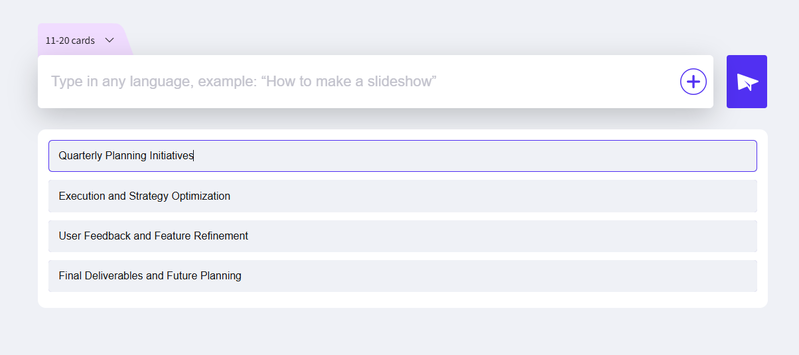
3. Integrated Presentation Tools (e.g., WorkPPT )
Best for: Automatically matching your script’s text to slide visuals.

How it helps the script: You feed these tools your main ideas, and they generate both the outline and the slides simultaneously. This saves time by ensuring your script is perfectly timed and synchronized with your visuals.
workppt presentation outline

⭐728323 presentations made

Example Presentation Script

Different situations need different scripts. Below is a business presentation script sample:

Slide 1 – Opening
“Good morning, everyone. Today I’ll introduce our new productivity tool and show how it helps teams work faster.”
[Slide]

Slide 2 – Current Problems
[Show Chart: ‘Weekly Time Lost per Employee’]“Most teams lose hours every week navigating multiple tools, tracking updates manually, and repeating workflows.”

[Highlight Data: 5–7 hours loss]“This chart shows how inefficiency accumulates and slows project delivery.”

Slide 3 – Market Landscape
“To understand the gap, here is a quick comparison of the most popular tools.”
[Show Table: Feature Comparison][Pause – audience reads 3 seconds]“As the table shows, current tools lack automation and unified workflows.”

Slide 4 – Our Solution
“Our platform centralizes tasks, automates updates, and gives teams real-time visibility.”
[Slide]

Slide 5 – Product Demo
“I’ll show you a quick demo so you can see how the system works.”
[Start Demo – 30 seconds]Show automatic task update
Show workflow automation
Show summary generation
[End Demo]

Slide 6 – Case Result
“Here’s the outcome from a marketing team that adopted our tool.”
[Show Chart: ‘Productivity Improvement Over 4 Weeks’][Highlight Data: +40% productivity]

Slide 7 – Closing
“In summary, our tool saves time, improves alignment, and reduces manual work. Thank you.”

How to Remember Presentation Script

1. Use Visual Anchors
You can use your slide elements as memory prompts. Images, icons, headlines, or color sections on each slide help you remember what to say next without reading from a script.

2. Apply the Chunking Technique
Break your script into small, manageable sections. Each chunk should cover one idea only. This makes your flow easier to recall and reduces the mental load during delivery.

Practice with Recording or AI Feedback
Record yourself giving the presentation or rehearse using an AI tool that provides feedback on pacing, clarity, and filler words. Repetition with feedback boosts retention and confidence.

5. For Group Presentations: Rehearse Transitions
Practice as a team and prepare clear handoff lines (“Now Alex will explain…”, “Next, Sarah will walk you through…”). Smooth transitions help everyone stay synchronized and remember their part of the script.

FAQs about Presentation Script

Q: Is a presentation script the same as my speaker notes?

A: No, they are different. A presentation script is the full text of every word you plan to say. Speaker notes are just short reminders (keywords, data) that you print or see on your screen during the talk.

Q: How long should my script be for a 10-minute presentation?

A: No. Currently, you cannot password protect individual slides. You can only protect the entire file.

Q: Can I use AI to write my entire script?

A: You can use AI to create a strong first draft or outline. However, you must always edit it again.

Q: How to Remember Script for Presentation Without Sounding Memorized?

A: Instead of memorizing words, you should memorize concepts and transitions. Practice the script by saying the same ideas using different words. Focus on where to pause, where to change your tone, and when to make eye contact.

Q: What is the biggest mistake when using a script?

A: The biggest mistake is reading the script word-for-word from the page or screen. This sounds robotic and makes you lose connection with the audience.

💬 Conclusion:

A clear presentation script helps you stay focused and feel confident on stage. To save time for crucial practice, let WorkPPT AI Generator handle your visuals. It instantly turns your outlines into clean, professional slides, allowing you to strengthen your message and delivery.

WorkPPT – Create Presentation in 1-Click

Simple enter the topic or upload files and get a complete presention in seconds.