

A simple guide to making and presenting a SWOT analysis presentation, including examples, templates, and presentation tips. However, do you know how to create and present it correctly?
Don’t worry. In this article, you will learn a detailed tutorial and tips for presenting. You will also see examples, common templates, and a simple presentation script you can use.
What Is SWOT Analysis in a Presentation
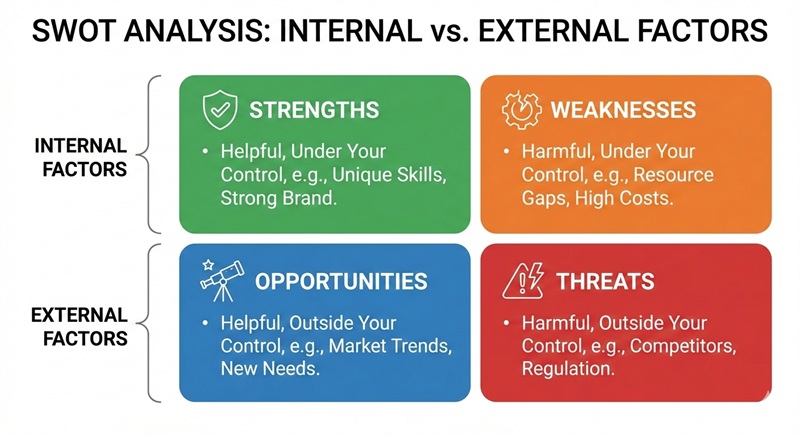
SWOT analysis stands for Strengths, Weaknesses, Opportunities, and Threats. In a presentation, it is not just a list of ideas. It is a visual way to explain your current situation and support your decisions.
- Strengths and Weaknesses are internal factors. They come from inside your company, project, or yourself.
- Opportunities and Threats are external factors. They come from the market, competitors, or the environment.
How to Make a SWOT Analysis Presentation
Step 1: Define the goal of your presentation
Before making slides, ask yourself why you are using SWOT analysis. Is it for strategy planning, marketing review, or personal development? A clear goal helps you choose the right content.
Step 2: Choose the right slide format
Common SWOT analysis presentation templates include:
- 2×2 matrix layout (classic and most used)
- Quadrant layout with icons
- One-slide summary for executives
Step 3: Select key SWOT points
Do not put everything into your slides. Choose the most important points for each category. This makes your SWOT analysis presentation easier to read and understand.
If you want to save time and make your SWOT slides more professional, several tools can help you quickly create and customize your presentation.
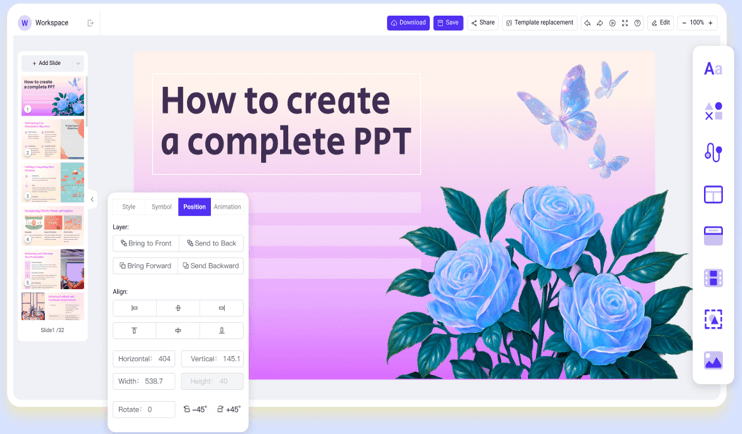
- WorkPPT allows you to generate slides from text or documents so that you can focus on insights rather than design.
⭐⭐⭐⭐⭐ Rated 4.8 by 1.3M Users
Best Way to Present SWOT Analysis
Making the slide is only half the job. You also need to know how to speak about it. The best way to present a SWOT analysis is to connect the dots. Don’t just read the list. You can prepare a script and practice in advance.
1. Start with Context, Not the Chart
Before showing the SWOT slide, explain the background in one or two sentences. This helps the audience understand what the analysis is about and why it matters.
Example:
“This SWOT analysis looks at our online learning platform and helps us decide where to focus next year.”
2. Present Strengths and Weaknesses Together
Strengths and Weaknesses are internal factors, so it is best to explain them together. Focus on only the most important points, not every detail.
Example:
“Our main strength is high-quality course content created by industry experts. However, our weakness is limited brand awareness, which makes it harder to reach new users.”
3. Explain Opportunities and Threats with Real Impact
Next, move to external factors. Explain how opportunities and threats can affect your plans.
Example:
“There is a growing demand for online learning, which gives us a strong opportunity to expand. At the same time, competition from large platforms is a major threat.”
4. Turn SWOT Points into Clear Insights
This is the most important part of a SWOT analysis presentation. Do not stop after listing the four areas. Explain what the analysis tells you.
Example insight:
“Although we face strong competition, our content quality and loyal users give us a good foundation to grow through partnerships.”
5. End with Actions or Next Steps
Always close your SWOT analysis presentation with actions. This shows that the analysis supports decision-making, not just discussion.
Example:
“Based on this SWOT analysis, our next step is to invest in marketing and develop AI-powered learning features.”
✍ [You May Also Like]: Presentation Techniques: How to Make an Effective Presentation
FAQs about SWOT Analysis Presentation
Q1: What are the elements of SWOT analysis?
A: The elements are:
Strengths: Internal advantages you have
Weaknesses: Internal disadvantages to address
Opportunities: External factors you can use to grow
Threats: External challenges or risks
Q2: Why SWOT analysis presentations matter?
A: SWOT analysis presentations help you understand a situation clearly and communicate insights effectively. They support decision-making and show strengths, weaknesses, opportunities, and threats visually.
Q3: What's the best format of SWOT analysis presentation?
A: The best format is a simple 2×2 matrix or quadrant layout. You can put Strengths & Weaknesses on the left and Opportunities & Threats on the right, or top/bottom. Keep text short, use visuals or icons, and focus on key points for clarity.
Q4: How many points should I include in each category?
A: It’s best to include 3–5 key points per category. Too many points make slides cluttered, while too few may miss important insights.
Q5: How do I explain SWOT analysis in a presentation?
A:
- Start with a short definition of the four categories.
- Focus on the most important points only.
- Connect each point to insights, outcomes, or actions.
- Use simple examples for clarity.
💬 Conclusion:
A SWOT analysis is only as powerful as the story you tell. Your audience doesn’t just want a list of facts; they want to see a clear path forward. Try tools like WorkPPT AI Presentation Maker with ready-made templates can save time and make your slides look professional.
With WorkPPT, design SWOT slides effortlessly. Input your idea,choose template and get polished slides in minutes.

It’s hard to find experienced people about this topic, but
you seem like you know what you’re talking about!
Thanks
First of all I would like to say wonderful blog! I had a
quick question which I’d like to ask if you do not mind.
I was curious to know how you center yourself and clear your thoughts prior to writing.
I’ve had a tough time clearing my thoughts in getting my thoughts out
there. I do enjoy writing but it just seems like the first 10
to 15 minutes are lost just trying to figure out how to begin.
Any ideas or tips? Cheers!
Hi,You need to think a topic, and then write an outline. Last, finish the article.
Greetings! I’ve been reading your site for a long time now
and finally got the bravery to go ahead and
give you a shout out from Atascocita Tx! Just wanted to say keep up the fantastic job!
Hi! Would you mind if I share your blog with my twitter group?
There’s a lot of people that I think would really enjoy your content.
Please let me know. Many thanks
Hi, it’s ok, I am glad to.